
- Published on
virtual memory 2
- Authors

- Name
- seren-wib
Contents
- 0. Problem statement - why are page tables a problem?
- 1. Linked list page table
- 2. Hashed page table
- Flow
- Variant: Clustered page table
- 3. Inverted page table
- 1. Regular page table vs Inverted page table
- Regular page table
- Inverted page table
- 2. Flow
- 3. Advantages
- 4. Disadvantages
- 5. Mitigation
- 4. Two-level Page Table
- Addendum
- Worst case
- 5. Multi-level page table
- There's a price
- 6. Let's page the page table
- Method 1. Keep the page table in physical memory
- Method 2. Put the page table in virtual memory too
- If we're paging the page table, let's page the operating system's memory too
- 7. TLB
- 1. TLB is implemented in hardware
- 2. TLB exploit locality
- 3. Why the TLB is fully associative
- Comparison of mapping schemes
- 4. When a TLB miss happens, who walks the page table and loads the PTE into the TLB?
- 1. Hardware managed TLB
- 2. Software managed TLB — handled by the OS
- trade off
- 5. TLB management
- 1. Maintaining consistency
- 2. Flush on context switch
- 3. Replacement policy
- 8. How the TLB / page table / disk we've learned so far actually work together on a single memory read
- case1: The common case (TLB hit, 99%+)
- case2: TLB miss (1%): two ways to handle it
- case3: Recursive fault -- what if the page table itself was paged out to disk?
- Types of page faults
- 1. Permission violation (protection fault)
- 2. Invalid — two sub-cases
- 0. Problem statement - why are page tables a problem?
- 1. Linked list page table
- 2. Hashed page table
- 3. Inverted page table
- 4. Two-level Page Table
- 5. Multi-level page table
- 6. Let's page the page table
- 7. TLB
- 8. How the TLB / page table / disk we've learned so far actually work together on a single memory read
0. Problem statement - why are page tables a problem?
Building the page table as one whole piece makes it too large
But the space actually used is very small
- Map only the parts actually used
- Method 1: make the page table structure dynamically expandable (with something like a linked list or tree)
- Method 2. add one more level of indirection (an intermediate step) — two-level, hashed, inverted, etc.
1. Linked list page table
- The linked list operations themselves are overhead (even though it saves memory)
- So a tree is used
2. Hashed page table
linked list = good on space, bad on time → hashed = saves time with hashing → clustered = saves even more space with blocks
Why a bucket holds a linked list: there will be other p's in the same bucket, so we search them with the linked list
- What each element (a node hanging off a bucket) holds:
- VPN (to compare whether it's really the p I'm looking for)
- the mapped frame number
- next pointer
Flow
- bucket: storage in the hash table that gathers entries with the same hash value
- p: page number
- d: offset
- r: frame number
p -> hash func(something like p%100) -> hash table -> bucket -> search the linked list for an entry equal to p -> when the matching p is found, map the r value
d -> d
Physical address r|d
Variant: Clustered page table
One entry maps a whole block of contiguous pages instead of a single page
Split the virtual address like this
[ Virtual Page Block Number | Block offset | Offset ]
One hash table entry
looks like VPBN | next | PPN0 | PPN1 | PPN2 | PPN3
That is, the frame numbers of one block (4 contiguous pages) are packed into one entry.
When the pattern is to use pages gathered in one place in a row rather than scattered, the number of entries drops by 4x, so the table gets smaller
3. Inverted page table
1. Regular page table vs Inverted page table
Regular page table
With a regular page table, each process has its own page table
Lookup is direct by virtual page number p
Fast, but with many processes and large virtual address spaces, the page tables get large
Inverted page table
Entries are created per physical frame, not per virtual page.
Exactly one table for the whole system, no matter how many processes there are
Each entry stores "this physical frame currently holds virtual page (p) of process (PID) such-and-such"
The frame number isn't stored separately for mapping; the frame number (i) itself is the entry's index
2. Flow
When the CPU issues pid | p | d:
- Search the table from the top for the entry where (PID, p) matches
- Which slot the matching entry is in = that is the physical frame number i
- Physical address = i | d
3. Advantages
- The table is proportional only to physical memory size - good memory savings
4. Disadvantages
- Lookup is slow (a regular table can find it in one shot with p, but this one has to search with pid and p)
- PID management is needed
- Reclaiming on process exit has huge overhead (a regular table can just be flushed, but here you have to reclaim entries one by one by pid)
5. Mitigation
Since lookup is too slow, put a hash table in front to narrow the search down to one entry, or a few at most.
So real inverted page tables are almost always used together with a hash.
4. Two-level Page Table
Split the 4MB table into pieces (secondary tables).
Pieces that aren't used are never created
Split the virtual address into 3 pieces like below
     10bit             10bit          12bit
[ Master page # | Secondary page # | Offset ]

Master page #: look up the first-level page table to find the link to the second-level table
Secondary page #: look up the second-level page table to get the frame number
Then combine the offset and the frame number to find the exact physical address
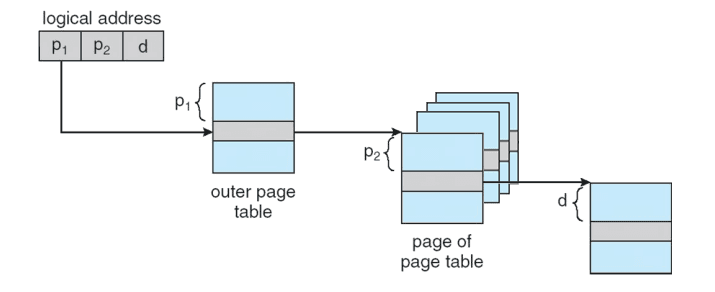
- p1 = Master page #
- p2 = Secondary page #
- d = Offset
Addendum
If you split it into a 10-bit master page and a 10-bit secondary page,
you need 2^10 (number of first-level page table entries) * 2^10 (number of second-level page table entries) entries, so the amount of memory doesn't go down
Number of secondary page tables: the number of master page table entries (2^10)
So if it's split into 2^8 and 2^12,
the number of secondary page tables drops to 2^8, but the entries per secondary page table grow to 2^12
Worst case
In the worst case (when every secondary page table is used)
With master page table entry = 2^10, secondary page table entry = 2^10,

all secondaries : 2^10 tables × 1024 entry × 4byte
               = 1024 × 4KB = 4MB
master table  : 1024 entry × 4byte = 4KB     ← extra
─────────────────────────────────────
total = 4MB + 4KB
So in the worst case, adding the 4kb extra (master page table) actually makes the memory size larger than with a single table.
5. Multi-level page table
Once the 64-bit era arrived, with two levels the master blows up again. So adding more levels is multi-level. The idea is the same
There's a price
More levels means more memory accesses per translation
- Plain table: table once + data once = 2x memory accesses
- Two-level: table twice + data once = 3x
- 3-level: 4x
6. Let's page the page table
The page table eats memory too; can't we page even the page table?
Method 1. Keep the page table in physical memory
- Directly accessible without address translation
- If you know the page table's address, you can read it immediately
- Downside: the page table keeps occupying RAM
Method 2. Put the page table in virtual memory too
Just as process pages are pushed out to disk, push the page table out to disk too
- Advantage: unused page tables can be pushed down to disk to save memory
- Problem: the page table the CPU needs for address translation (outer page table) could also be pushed down to disk
- Solution: the outer page table (e.g. the master page table) is never pushed down to disk (wiring)
If we're paging the page table, let's page the operating system's memory too
Kernel memory = it used to have to be in RAM no matter what, but if unused it can be pushed down to disk
Exceptions: interrupt handlers (keyboard interrupt, timer interrupt) and exception handlers (page fault) must not be pushed down
7. TLB
TLB: an ultra-fast cache that stores recently used VPN → PFN results
On a TLB hit, read the data right away; on a miss, look up the page table and then read the data
MMU(Memory Management Unit): hardware inside the CPU
1. TLB is implemented in hardware
- Why is the TLB fast?: Fully Associative Cache: all entries in the TLB are checked at the same time
- The TLB stores the whole PTE
- If the PTE's valid bit = 1 it's in physical memory, if 0 it's on disk.
- With just the PFN info in the PTE and the original offset, the MMU can build the physical address right away
- Even if a process has a million pages, the CPU is actually using only a few pages right now.
2. TLB exploit locality
- Even if a process has a million pages, the CPU is actually using only a few pages right now.
- A TLB usually has 16
48 entries (× 4KB = covers 64192KB), enough to hold the hot set, the working set (the bundle of pages in use right now)
- A TLB usually has 16
3. Why the TLB is fully associative
Large L1/L2 caches: thousands of entries → making them all fully associative needs thousands of comparators → too expensive → compromise with direct/set associative
TLB: only 16~48 entries. Since it's small, the comparator cost of comparing them all in parallel is affordable. Also the TLB is used on every memory access and a single conflict miss is fatal, so the hit rate is everything
Comparison of mapping schemes
| Scheme | Where it can go | Search range |
|---|---|---|
| Direct mapped | Exactly 1 place | Looks at only 1 slot |
| Set associative | Anywhere within one set | Looks at only that set (a few slots) |
| Fully associative | Anywhere | Parallel search of everything |
1-way 10.3% → 2-way 8.6% → 4-way 8.3% → 8-way 8.1%
1→2way drops the most and after that only a little (diminishing returns) → so large caches stop at 2~4way
"Is higher associativity always better? → diminishing, so moderately
4. When a TLB miss happens, who walks the page table and loads the PTE into the TLB?
1. Hardware managed TLB
- The MMU knows where the page table is in memory (through a register like CR3)
- On a TLB miss, the MMU walks the page table itself (page walk), finds the PTE and fills the TLB
- The OS isn't involved in this process — the hardware handles it all
- The price: the page table has to be in a hardware-defined format. Since the MMU reads it directly, the structure is fixed. The OS can't change it as it likes.
2. Software managed TLB — handled by the OS
- TLB miss → trap (fault) to the OS
- The OS finds the matching PTE in the page table and loads it into the TLB
- When done, return from the exception and the TLB carries on
- Speed: has to be fast. Still usually takes 20~200 cycles (the cost of taking a fault and running the OS handler)
- The CPU's ISA has separate TLB manipulation instructions (so the OS can write into the TLB directly)
- Advantage: the OS can use any page table format it likes. Because the hardware doesn't read it. Flexible.
trade off
| Item | Hardware managed (x86) | Software managed |
|---|---|---|
| Who handles a miss | MMU (hardware) | OS (software) |
| Speed | Fast | Slow (20~200 cycle, fault cost) |
| Page table format | Fixed by hardware | Up to the OS (flexible) |
| OS involvement | None | Involved via trap |
5. TLB management
1. Maintaining consistency
The OS must make sure the TLB and the page table always agree.
2. Flush on context switch
The price: "blow everything away, take cold misses, repeat". Right after a flush the new process's TLB is empty, so at first everything misses (cold start) Alternative: store the PID along with each TLB entry (ASID). Then A's and B's entries are distinguished by PID, so they can coexist without a flush → no cold misses
3. Replacement policy
When a new PTE has to come in on a TLB miss, an existing PTE has to be evicted.
- Choosing whom to evict is the TLB replacement policy
- It's the job of picking a victim PTE
- Implemented in hardware, and usually simple (e.g. LRU — the one unused for the longest)
- Unlike page replacement, TLB replacement has to be done fast by the hardware, so it can't use sophisticated algorithms. Something simple is hardwired.
8. How the TLB / page table / disk we've learned so far actually work together on a single memory read
case1: The common case (TLB hit, 99%+)
- The CPU generates a virtual address (VA) to access memory
- The VA goes into the MMU. The MMU splits the VA into [VPN | Offset]
- The MMU looks up the TLB with the VPN (fully associative, so all entries are searched in parallel)
- TLB hit → take the PFN out of the matching entry
- The MMU assembles PFN + Offset = physical address (PA)
- The MMU sends the PA to memory (strictly, the cache/memory bus) → the data comes back to the CPU
- The OS isn't involved at all in this process
case2: TLB miss (1%): two ways to handle it
- Hardware managed: the MMU loads the PTE directly from the page table in memory. No OS involvement (the OS laid out the table in advance so the HW can read it)
- Software managed: trap to the OS → the OS does a table lookup → loads the PTE into the TLB → returns from the exception → the TLB carries on
case3: Recursive fault -- what if the page table itself was paged out to disk?
You go to do a table lookup (whether HW or OS) and the table is on disk → recursive page fault
The page fault handler pulls the page table up into physical memory
Then the PTE is loaded into the TLB
Once the PTE is in the TLB, the translation restarts
Common case: that PTE points to a valid page in memory (resolved)
Rare case: another fault on the PTE (e.g. the page is invalid) → one more level
Types of page faults
1. Permission violation (protection fault)
- Attempting an operation (read/write/execute) not allowed on that page
- OS handling: usually returns the fault to the process (segfault), or plays a trick
- things like copy-on-write and memory-mapped files (intercept the write attempt and do the actual copy/mapping)
2. Invalid — two sub-cases
Not allocated: the virtual page is in a region not allocated yet → the OS either sends a fault to the process (bad access) or allocates a frame
Not in memory (not in physical memory): the page is on disk → the OS allocates a frame → reads it from disk → maps the PTE to that frame (this is the core action of "page fault handling")