
- Published on
secondary storage
- Authors

- Name
- seren-wib
Contents
- 1. Secondary Storage (this mainly covers HDDs)
- 2. HDD structure
- 1. Mechanical (the source of slowness = physically moving parts)
- 2. Electronics
- 3. Physical units
- 1. track: one concentric circle on one platter surface
- 2. sector: the smallest read/write unit a track is divided into
- 3. cylinder: the set of tracks at the same radius on multiple surfaces, grouped vertically
- 4. platter / surface / spindle
- 3. How the OS handles HDDs (Managing Disks)
- 1. Access abstraction layers (top=abstract, bottom=physical)
- 2. High-level interface (e.g. SCSI)
- 4. The 3 components of Disk Performance
- 1. Seek time
- 2. Rotational latency
- 3. Transfer time
- 5. Reducing the seek bottleneck (Disk Scheduling)
- 1. Purpose
- 2. Algorithms
- 1. FCFS: in arrival order as is. Fine under low load, but as it grows it shuttles back and forth → long waiting times
- 2. SSTF: the request closest to the current head first. Minimal seek, request rate↑
- 3. SCAN (elevator): serve to the end in one direction, then reverse. Non-uniform waiting time
- 4. C-SCAN: serve in one direction only; on hitting the end, jump back to the start and go the same direction again
- 5. LOOK / C-LOOK: same as SCAN/C-SCAN, but move only as far as "the last request in that direction" instead of the disk end (0·199) → removes wasted travel
- 6. Applying it to real HDD use
- 1. Criteria for choosing an algorithm
- 2. What an I/O Scheduler has to do
- 3. Disks today (Modern Disks)
- 1. Secondary Storage (this mainly covers HDDs)
- 2. HDD structure
- 3. How the OS handles HDDs (Managing Disks)
- 4. The 3 components of Disk Performance
- 5. Reducing the seek bottleneck (Disk Scheduling)
- 6. Applying it to real HDD use
1. Secondary Storage (this mainly covers HDDs)
- Definition: storage outside primary memory. The CPU can't access it directly → can't execute instructions directly, can't read/write data directly (it must be loaded into memory to be used)
- 4 characteristics
- Large: 4TB or more
- Cheap: low cost per unit of capacity
- Persistent: data is kept even when power is cut (non-volatile)
- Slow: access takes ms (about a 10^6x difference from memory's ns)
2. HDD structure
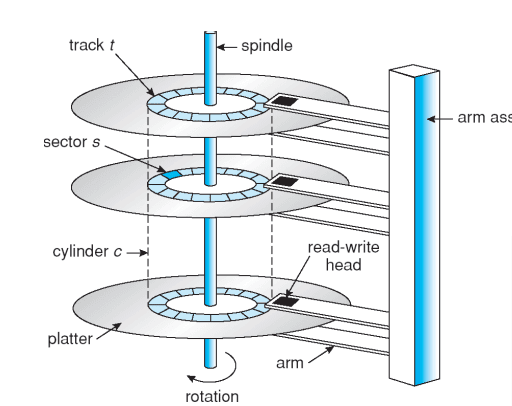
1. Mechanical (the source of slowness = physically moving parts)
- Rotating platters (disks)
- arm assembly (the arm carrying the heads)
2. Electronics
- disk controller: handles requests
- buffer: cache memory
- host interface: connects to the host (SATA, etc.)
3. Physical units
1. track: one concentric circle on one platter surface
2. sector: the smallest read/write unit a track is divided into
3. cylinder: the set of tracks at the same radius on multiple surfaces, grouped vertically
(the tracks all heads touch at once at one arm position)
4. platter / surface / spindle
- platter: the disk / surface: one side of the disk (top or bottom) / spindle: the shaft the platters are mounted on and rotated by
3. How the OS handles HDDs (Managing Disks)
- Premise: a disk is a messy physical device (errors, bad blocks, missed seeks) → the OS's job = hide this mess from higher-level SW
1. Access abstraction layers (top=abstract, bottom=physical)
- logical file (file name, byte#) ← user library (user level)
- disk logical block (block#) ← filesystem (kernel level)
- physical disk block (surface/cylinder/sector) ← block layer (kernel level) e.g.: "a.txt" → block 1234 → S1, C3, S200. The app only needs to know "a.txt"
2. High-level interface (e.g. SCSI)
- In the past: the OS specified cylinder/surface/track/sector all by itself → the OS had to know all the disk parameters
- Today: the disk exposes its data as an array of logical blocks [0..N-1] → the OS just passes a block number, and the disk maps it to a physical location on its own → the physical parameters are hidden from the OS (to cope with modern disks that got complicated, with varying sector sizes, remapping, etc.)
4. The 3 components of Disk Performance
1. Seek time
Move the arm to the target cylinder. The arm has to physically move — the slowest
2. Rotational latency
Wait for rotation until the target sector comes under the head. Depends on rpm — slow
3. Transfer time
Data is transferred as the sector passes under the head. Depends on recording density — fast
→ Of the three, Seek (arm movement) is by far the bottleneck
※ What if it's an SSD? No arm or rotation, so Seek and Rotation = 0 → these 3 components and the scheduling in section 5 below become entirely meaningless
Breaking it down, we find that Seek (arm movement) is the overwhelmingly slow bottleneck
5. Reducing the seek bottleneck (Disk Scheduling)
1. Purpose
- Seeks are expensive → if a request comes in while the disk is busy, the waiting requests pile up in the disk queue
- Rearrange the order the queue is processed in → fewer seeks and disk bandwidth↑
2. Algorithms
(Common example: queue = 98,183,37,122,14,124,65,67 / head starts at = 53)
1. FCFS: in arrival order as is. Fine under low load, but as it grows it shuttles back and forth → long waiting times
2. SSTF: the request closest to the current head first. Minimal seek, request rate↑
Disadvantage: favors the middle blocks → requests at the edges can starve
3. SCAN (elevator): serve to the end in one direction, then reverse. Non-uniform waiting time
4. C-SCAN: serve in one direction only; on hitting the end, jump back to the start and go the same direction again
→ Uniform waiting time (goes all the way to the end even if there are no requests in that direction)
5. LOOK / C-LOOK: same as SCAN/C-SCAN, but move only as far as "the last request in that direction" instead of the disk end (0·199) → removes wasted travel
6. Applying it to real HDD use
1. Criteria for choosing an algorithm
These days it's best not to do scheduling at all
- SSTF: common and intuitive → a safe default
- High-load systems → SCAN / C-SCAN do better
- SSTF or LOOK is reasonable as the default algorithm
- Performance depends on the number and type of requests, and on the file allocation method
2. What an I/O Scheduler has to do
- throughput↑: merge requests (reduce their number) + reorder/sort (reduce seeks)
- Prevent starvation: submit requests before their deadline
- Guarantee fairness between processes
- Guarantee QoS (quality-of-service) requirements
3. Disks today (Modern Disks)
- intelligent controller: a small CPU + tens of KB of memory, loaded with the manufacturer's program
- Features: read-ahead (prefetch the current track) / caching (frequently used blocks) / command queuing / request reordering (seek and rotation optimization) / retry / identifying and remapping bad blocks and tracks
- → The disk does its own scheduling. It ignores and overrides the OS's scheduling (because it knows its own layout better than the OS)