
- Published on
Stairno 2. The Plan and the Cross-Domain Sign-in Experiment
- Authors

- Name
- seren-wib
Contents
- In one line
- 1. The day the account center became its own project
- 2. Why documents first
- Four documents
- The plan: write down what you will not do first
- SRS: numbered promises
- Repo documents
- 3. The biggest question: does sign-in work across domains?
- Why cookies cannot do it
- The alternative: OIDC
- How the experiment worked
- The results: all 13 steps passed
- What the experiment taught
- 4. Structure: one repo, two servers
- 5. Why these tools
- 6. Step 2 done
Roadmap step 2: what was done before writing a single line of account center code. The big picture is in Stairno 0. The whole roadmap.
In one line
What the account center does, what it does not do, and how it will be built were settled first in four documents. Then the most uncertain question, "can sites on different domains share a sign-in?", was answered with a small experiment. The answer was "not with cookies, but yes with OIDC".
1. The day the account center became its own project
On 17 October, while writing the project plan for Labs (the product store), a problem showed. Labs needs sign-in and payments. Works (freelance) needs deposit payments too. Products that come later will need sign-in. Putting this into each site's plan would cause exactly the "same work four times" described in Stairno 0.
So I wrote this into the decision log of the Labs plan and split accounts and payments into their own project and their own repo.
- The account center
account.stairno.comand the shared APIapi.stairno.comare built as one project - Every Stairno site and product except the hub has no accounts or payments of its own and calls these two
- Domestic payments go through Toss Payments, international ones through PayPal
That evening I created the empty repo seren-wib/account.stairno.com. It had a one-line README.
2. Why documents first
Sign-in and payments are an area where a mistake means someone's account gets taken over or someone's money goes the wrong way. And I am both the client and the developer. Working alone, "how far did I decide to go?" lives only in my head, and the scope keeps growing as you work.
So I used the deliverables from my university software engineering course as they are. The hub, an introduction site, got documents too, but the account center handles sign-in and payments, so it got the full set, not a trimmed one.
Four documents
| Document | Question | What is in it |
|---|---|---|
| Project plan | Why, how far, what is risky | Goals, scope (part 1 sign-in / part 2 payments / part 3 extensions / out of scope), risks and responses, costs, decision log |
| Requirements specification (SRS) | What to build | 85 functional requirements, 21 non-functional, 9 domain, 12 use cases |
| Design specification (SDD) | How to build it | Structure, folders, DB tables, API, payment sequence diagrams, screens, error codes, decision log |
| Test and deploy document | How to check it and ship it | Test layers, deploy procedure, rehearsal procedure, acceptance checklist, personal data breach response |
The originals are written in Markdown and copied into Google Docs for sharing. The rule "if code and documents disagree, fix one of them in the same change" was set at this point too.
The plan: write down what you will not do first
The most useful part of the plan was the out of scope list.
- Social sign-in (Google, Apple), passkeys, two-factor authentication → part 3. Part 1 is email and password only
- An admin screen → not built. At first, the DB and the providers' dashboards are used directly
- Product catalog and checkout screens → Labs' job
- Real payments → after business registration. Until then, everything is in test mode
And the rule "a change that widens the scope only happens after the plan's scope and decision log are changed first". Since a new "let's add this too" has to go through the documents first, the scope does not grow on a whim.
The risk table was written up front too. For example:
| Risk | Response |
|---|---|
| Sign-in cannot be shared across domains | Check with an experiment before designing (section 3 below) |
| The chosen tools do not run on Cloudflare Workers | Actually deploy sign-up and sign-in on the first day of code. If it fails, change the runtime |
| Payment incidents (double charges, lost notices, amount mismatches) | Draw the order state rules first. The server re-checks amounts |
| Handling card data | Never take or store card numbers. The provider's screen takes them |
| Stalling halfway, being one person | Finish part 1 so that site sign-in works on its own |
SRS: numbered promises
Every requirement gets a number. For example:
FR-3 Sign in with email and password. Report failure with a single message: "The email or password is incorrect." How to check: the response body is the same for an unknown email and a wrong password.
Why lump the failure reasons together? If the site says "no such email" and "wrong password" separately, an attacker can try arbitrary emails and learn "whether this person has a Stairno account".
The number goes straight into the test name (FR-3 returns the same body for an unknown email and a wrong password). Later, "did we check FR-3?" on the acceptance checklist is one search over test names.
Repo documents
Three more documents live inside the code repo.
README.md: what this repo is and how to run it. A public document, so written in EnglishCONTRIBUTING.md: rules for branches, commits, PRs and deploysCLAUDE.md: the working rules the AI coding agent reads. Things like "only the API touches the DB", "never write code that takes card numbers", "never put secrets in the repo"
3. The biggest question: does sign-in work across domains?
The account center exists so that "signing in at account.stairno.com means being signed in at stairnolabs.com too". If that does not work, the rest of the design is meaningless. So I ran an experiment in the middle of writing the documents.
Why cookies cannot do it
A signed-in state is usually remembered with a cookie. But a cookie is only sent to the site that gave it.
account.stairno.comandapi.stairno.comare rooms in the same house (stairno.com), so they can share a cookie if configured tostairnolabs.comis a different house. Cookies fromstairno.comdo not go there- Browsers like Safari block third-party cookies, the way of borrowing another house's cookie
So sharing cookies was never an option.
The alternative: OIDC
Use OIDC, the same mechanism as "Sign in with Google". The account center becomes the ID office (the provider), and each site becomes the side that picks up the ID (a client). A site sends the user to the account center, then takes the user who comes back with a one-time code and creates its own sign-in with its own cookie. Cookies stay in their own houses, and houses meet only through redirects.
The question was whether Better Auth, the auth component I chose, properly does the OIDC provider role too. That feature (@better-auth/oauth-provider) is relatively new, so the documentation alone was not enough to trust.
How the experiment worked
- Run two servers on my computer: a stand-in for the account center (port 4101) and a stand-in for Labs (port 4102). Both use Better Auth
- Turn on the OIDC provider feature in the account center stand-in, and configure the Labs stand-in as a client pointing at that provider
- A script moves instead of a browser. It keeps a separate cookie jar per origin and follows redirects one by one, like a real browser. That way you see whether sign-in works "with cookies never mixing"
The results: all 13 steps passed
| Step | What was done | Result |
|---|---|---|
| 1 | Sign up at the account center | An account center cookie appears |
| 2 | Register Labs as a site with the account center | A site name tag (client_id) and password (client_secret) issued |
| 3 | Read the account center's notice | The sign-in, token and public key addresses are all there |
| 4 | "Sign in with Stairno" on Labs | Sent to the account center's address. PKCE applied |
| 5 | Arrive at the account center while signed out | Taken to the sign-in page. The original request comes along with an anti-forgery signature |
| 6 | Enter the password on the sign-in page | The sign-in response is directly "go back to Labs + code" |
| 7 | Ask again while already signed in | Back to Labs in a single redirect, no consent screen |
| 8 | Labs exchanges the code for a token | Success. Labs creates its own sign-in with its own cookie |
| 9 | Ask Labs "who is this?" | The same person as at the account center (same email) |
| 10 | Swap the cookies around | Account center cookie on Labs → nobody. Same the other way. Sign-ins are per site |
| 11 | Inspect the access token Labs received | A JWT. Signature verified with the account center's public keys, valid for 1 hour |
| 12 | ID token, refresh token | Both present |
| 13 | Sign in again on Labs while the account center session lives | One redirect, no password |
Conclusion: it works. Not by sharing cookies, but through OIDC.
What the experiment taught
Without the experiment, each of these would have been hit one at a time while coding. All of them went into the design specification.
- Access tokens come out as "a meaningless string" by default. The request has to say "this token is for
api.stairno.com" (theresourcevalue) to get a JWT whose content can be checked. The API checks that "who is it for" value - Real production sites must use https return addresses. The experiment ran locally, so it used an exception setting
- All the sites are Stairno, so they are registered to skip the "may this site receive your information?" consent screen. That setting can only be made through an internal admin command, and the feature that lets anyone register a site is turned off
- The sign-in page has to keep the request details that came along and send them together with the password. That way the user goes straight back to the original site once sign-in is done
- Not covered by the experiment: real https, sharing cookies between
stairno.comsubdomains, and running on Cloudflare Workers. Those were to be checked in production on the first day of step 3
The experiment code stays in the repo at experiments/cross-domain-login, and it is rerun every time Better Auth is upgraded to check that all 13 still pass.
4. Structure: one repo, two servers
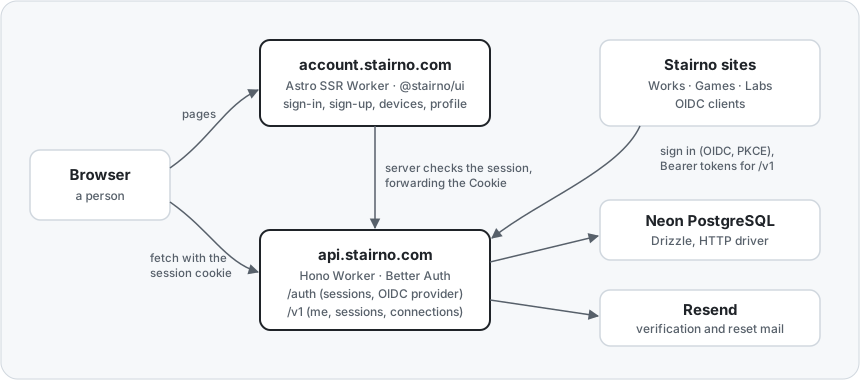
The structure for part 1 (sign-in). Part 2 adds payment providers and file storage behind the API
api.stairno.com(shared API): sign-in, sessions, the OIDC provider, and later orders and payments. It is the only thing that touches the DBaccount.stairno.com(account center): the screens people see. It does not open the DB itself but calls the API. Even when building a page on the server, it forwards the cookie the browser sent and asks the API "who is this?"- Sites: sign in with OIDC and call the API with tokens
Thanks to the single rule "only the API touches the DB", the data rules (who may see what) live in the API alone. However many screens there are, there is one set of data rules.
5. Why these tools
The yardstick is the first principle from Stairno 0: can one person run it?
| Area | Chosen | Why |
|---|---|---|
| Server | Cloudflare Workers | Same place as the hub. No server machine to manage, starts free, subscriptions can renew with cron |
| API skeleton | Hono | Runs on any server runtime. If Workers does not fit, most code stays the same elsewhere |
| Auth | Better Auth + OIDC provider + JWT | Sign-up, sign-in, sessions and rate limiting built in, and the experiment confirmed the OIDC provider role |
| DB | Neon (PostgreSQL) + Drizzle | A managed DB with a free tier. Has a connection mode that runs on Workers. Table design stays as code |
| Resend | Simple to send, 3,000 mails a month free. Domain authentication keeps mail out of spam | |
| Screens | Astro + @stairno/ui | Same tool and look as the hub. Screens differ per signed-in person, so SSR |
| Tests | Vitest | One tool from a single part up to the real server engine |
Fixed costs during test mode are zero. Once real payments start, costs begin with the Workers paid plan (5 dollars a month).
6. Step 2 done
In the early hours of 18 October, with the four documents finished and the repo documents and experiment code added to the repo, step 2 closed. Next was step 3: actually building it to these documents.