
- Published on
CH5. Relational Algebra on One Page
- Authors

- Name
- seren-wib
Contents
- Relational Algebra on One Page (all of chapter 6)
- 1. Symbols at a glance
- 2. Picking rows σ
- 3. Picking columns π
- 4. Chaining and renaming ρ
- 5. Set operations ∪ ∩ −
- 6. Every combination ×
- 7. Joining ⋈
- 8. Counting ℱ
- 9. Finding what has all of them ÷
- 10. The complete set and query trees
- 11. Same question, SQL next to relational algebra
- 12. Question wording → symbols
Relational Algebra on One Page (all of chapter 6)
SQL says "what you want", relational algebra says "in what order to pull it out". When writing answers, breaking them into one line per step with ← keeps you from going wrong
1. Symbols at a glance
| Symbol | Name | What it does | SQL |
|---|---|---|---|
| σcondition(R) | SELECT | Rows that meet the condition | WHERE |
| πcolumns(R) | PROJECT | Only the listed columns, duplicates removed | SELECT DISTINCT |
| ρS(columns…)(R) | RENAME | Renames tables and columns | AS |
| R ∪ S, R ∩ S, R − S | Set operations | Union, intersection, difference | UNION, INTERSECT, EXCEPT |
| R × S | CARTESIAN PRODUCT | Every combination of rows | FROM R, S (no condition) |
| R ⋈condition S | JOIN | Joins rows that meet the condition | JOIN ON |
| R * S | NATURAL JOIN | Joins on same-named columns and keeps one of each | NATURAL JOIN |
| R ⟕ S, R ⟖ S, R ⟗ S | OUTER JOIN | Keeps rows even without a match | LEFT / RIGHT / FULL OUTER JOIN |
| grouping columnsℱfunction column(R) | Aggregation | Groups, then COUNT, SUM… | GROUP BY + aggregates |
| R ÷ S | DIVISION | R rows that have all of S | NOT EXISTS … EXCEPT |
| T ← expression | Assignment | Names an intermediate result | Temporary table |
2. Picking rows σ
σcondition(R): only the rows that meet the condition. Columns unchanged
- Conditions are
column op value/column op column, with AND, OR, NOT. Comparisons are =, <, ≤, >, ≥, ≠
σDno=4(EMPLOYEE) → employees in department 4
σ(Dno=4 AND Salary>25000) OR (Dno=5 AND Salary>30000)(EMPLOYEE)
- σc1(σc2(R)) = σc1 AND c2(R). Order doesn't matter
- It's called SELECT but it's SQL's WHERE. SQL's SELECT slot is π
3. Picking columns π
πcolumn list(R): only the listed columns. The result is a set, so duplicate rows are removed
πLname, Fname, Salary(EMPLOYEE) → three columns
πSex, Salary(EMPLOYEE) → two (M, 25000) rows become one
4. Chaining and renaming ρ
Either way: nest with parentheses / break with ←. Runs from the inside (the lower line) first
πFname, Lname, Salary(σDno=5(EMPLOYEE))
DEP5_EMPS ← σDno=5(EMPLOYEE)
RESULT ← πFname, Lname, Salary(DEP5_EMPS)
| How to write ρ | What it renames |
|---|---|
| ρS(B1, B2, …)(R) | Table name S, column names B1, B2… |
| ρS(R) | Table name only |
| ρ(B1, B2, …)(R) | Column names only |
| R(B1, B2, …) ← expression | Column names can also go on the left of ← |
R(First_name, Last_name, Salary) ← πFname, Lname, Salary(DEP5_EMPS)
5. Set operations ∪ ∩ −
Requirement: same number of columns and the same type in each column (type compatible)
| Expression | Result | Example |
|---|---|---|
| R ∪ S | Rows in at least one of them, duplicates removed | Students or instructors |
| R ∩ S | Rows in both | Students who are also instructors |
| R − S | Rows in R but not in S. Not the same as S − R | Students who aren't instructors |
RESULT1 ← πSsn(DEP5_EMPS)
RESULT2(Ssn) ← πSuper_ssn(DEP5_EMPS)
RESULT ← RESULT1 ∪ RESULT2
- Ssns of employees in department 5 or their direct supervisors. The column names differ, so (Ssn) is added to RESULT2
6. Every combination ×
R × S: attaches every S row to each R row. n + m columns, |R| × |S| rows. Types don't need to match
- Junk on its own. Follow it with σ to keep only matching combinations → the two together are a JOIN
FEMALE_EMPS ← σSex='F'(EMPLOYEE)
EMPNAMES ← πFname, Lname, Ssn(FEMALE_EMPS)
EMP_DEPENDENTS ← EMPNAMES × DEPENDENT
ACTUAL_DEPENDENTS ← σSsn=Essn(EMP_DEPENDENTS)
RESULT ← πFname, Lname, Dependent_name(ACTUAL_DEPENDENTS)
- Female employees and their dependents' names. Build 3 rows × 7 rows = 21 rows, then keep only the matches with σ
7. Joining ⋈
R ⋈condition S = σcondition(R × S). Puts an R row and an S row that meet the condition on one line
DEPT_MGR ← DEPARTMENT ⋈Mgr_ssn=Ssn EMPLOYEE
RESULT ← πDname, Lname, Fname(DEPT_MGR)
- Manager name for each department
| Kind | Condition | Result columns |
|---|---|---|
| THETA JOIN ⋈A θ B | θ is any of =, <, ≤, >, ≥, ≠ | All R columns + all S columns |
| EQUIJOIN ⋈A=B | = only | All R columns + all S columns. Both equal-valued columns stay (Mgr_ssn, Ssn) |
| NATURAL JOIN R * S | = on same-named columns | Only one of each same-named column |
- NATURAL JOIN needs the column names to match. If they don't, align them with ρ first
DEPT ← ρ(Dname, Dnum, Mgr_ssn, Mgr_start_date)(DEPARTMENT)
PROJ_DEPT ← PROJECT * DEPT
Dnumber → Dnum to match PROJECT.Dnum
Number of result rows: 0 (nothing matches) to |R| × |S| (everything matches)
OUTER JOIN: keeps rows without a match too, with NULL in the empty cells. ⟕ all left, ⟖ all right, ⟗ both
TEMP ← EMPLOYEE ⟕Ssn=Mgr_ssn DEPARTMENT
RESULT ← πFname, Minit, Lname, Dname(TEMP)
- Every employee + the name of the department they manage. Dname is NULL for non-managers
8. Counting ℱ
grouping columns ℱ function column, …(R): groups rows with equal grouping columns and applies the functions. The functions are COUNT, SUM, AVERAGE, MAXIMUM, MINIMUM
Dno ℱ COUNT Ssn, AVERAGE Salary(EMPLOYEE) - Employee count and average salary per department. Result columns Dno, Count_ssn, Average_salary
ℱ COUNT Ssn, AVERAGE Salary(EMPLOYEE)
- Without grouping columns everything is one group → one row
ρR(Dno, No_of_employees, Average_sal)(Dno ℱ COUNT Ssn, AVERAGE Salary(EMPLOYEE))
Wrap it in ρ to rename the columns
Counts without removing duplicates / skips NULLs / the result is a table even if it's a single cell
9. Finding what has all of them ÷
R ÷ S: the R rows that have all values in S. S's columns must be a subset of R's, and result columns = R's columns − S's columns
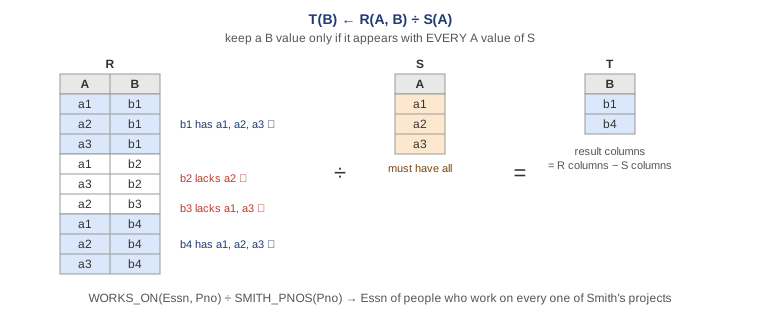
SMITH ← σFname='John' AND Lname='Smith'(EMPLOYEE)
SMITH_PNOS ← πPno(WORKS_ON ⋈Essn=Ssn SMITH)
SSN_PNOS ← πEssn, Pno(WORKS_ON)
SSNS(Ssn) ← SSN_PNOS ÷ SMITH_PNOS
RESULT ← πFname, Lname(SSNS * EMPLOYEE)
- Employees who work on every project Smith works on. If SMITH_PNOS = {1, 2}, only Essns that work on both 1 and 2 remain
Template for ÷: ① build S, the list of "all" (π of one column) → ② build R, who does what (π of two columns, including S's column) → ③ R ÷ S → ④ join back to the original with * to get names
10. The complete set and query trees
Complete set {σ, π, ∪, ρ, −, ×}: these six make all the others
- R ∩ S = (R ∪ S) − ((R − S) ∪ (S − R))
- R ⋈c S = σc(R × S)
Query tree: the expression as a tree. Leaves = tables, inner nodes = operations, runs from the leaves upward
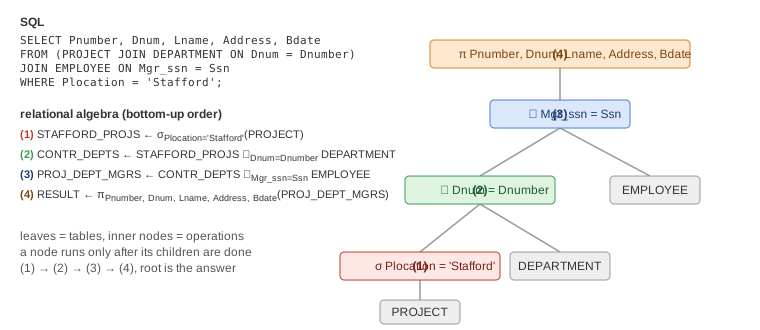
11. Same question, SQL next to relational algebra
| Question | SQL | Relational algebra |
|---|---|---|
| Names and salaries of department 5 employees | SELECT Fname, Lname, Salary FROM EMPLOYEE WHERE Dno = 5 | πFname, Lname, Salary(σDno=5(EMPLOYEE)) |
| Names and addresses of Research employees | SELECT Fname, Lname, Address FROM EMPLOYEE, DEPARTMENT WHERE Dname = 'Research' AND Dnumber = Dno | RESEARCH ← σDname='Research'(DEPARTMENT) / RD ← RESEARCH ⋈Dnumber=Dno EMPLOYEE / πFname, Lname, Address(RD) |
| Employee and supervisor names | … FROM EMPLOYEE AS E, EMPLOYEE AS S WHERE E.Super_ssn = S.Ssn | S ← ρS(Sssn, Sfn, Sln, …)(EMPLOYEE) / EMPLOYEE ⋈Super_ssn=Sssn S |
| Employee count per department | SELECT Dno, COUNT(*) FROM EMPLOYEE GROUP BY Dno | Dno ℱ COUNT Ssn(EMPLOYEE) |
| Employees with no dependents | WHERE NOT EXISTS (SELECT * FROM DEPENDENT WHERE Ssn = Essn) | ALL ← πSsn(EMPLOYEE) / HAS ← πEssn(DEPENDENT) / πFname, Lname((ALL − HAS) * EMPLOYEE) |
| Working on every department 5 project | WHERE NOT EXISTS ((SELECT Pnumber FROM PROJECT WHERE Dnum = 5) EXCEPT (SELECT Pno FROM WORKS_ON WHERE Essn = Ssn)) | P5 ← πPnumber(σDnum=5(PROJECT)) / SP ← πEssn, Pno(WORKS_ON) / SP ÷ P5 |
| Employee + supervisor, including employees with no supervisor | LEFT OUTER JOIN | EMPLOYEE ⟕Super_ssn=Sssn S |
12. Question wording → symbols
| When the question says | Use |
|---|---|
| who are ~ (condition) | σ |
| the names, numbers of ~ (picking columns) | π. At the very end |
| Columns from two tables | ⋈FK=PK. * if the column names match |
| An employee and their supervisor | Rename a copy of EMPLOYEE's columns with ρ, then ⋈ |
| ~ or ~ | ∪ (with matching columns) |
| ~ and also ~ (in both results) | ∩ |
| not ~, with no ~ | − (all − the ones that have it) |
| How many, sum, average | ℱ |
| per ~, for each ~ | Grouping columns before ℱ |
| working on all, every ~ | ÷ |
| Rows without a match must show too | ⟕ ⟖ ⟗ |
| Column names don't match so * can't be used / renaming result columns | ρ |