
- Published on
Network Overview
- Authors

- Name
- seren-wib
Contents
- 0. Glossary
- 1. Network overview
- 1. Components
- 2. Router vs switch
- 3. History
- 4. How it works
- 5. Physical setup
- 2. Network protocols
- 1. Definition of a protocol
- 2. Why layering is needed
- Advantages of layering
- 3. OSI 7 layers
- Encapsulation
- 4. TCP/IP model
- 3. Network layer
- 1. Role
- 2. Addressing scheme
- IP address
- MAC address
- IP and MAC complement each other.
- Example
- 4. IP addressing
- 1. IP address basics
- 1. Why is it needed?
- 2. What does it look like?
- 2. Structure
- 3. Classes
- 4. Why split into NetID / HostID at all
- 5. Subnetting
- How to split an IP address
- Example
- 6. Subnet mask
- 7. How to find which subnet an arbitrary IP belongs to
- 8. Calculating the number of hosts
- 9. IPv6, IPv4
- IPv6
- 5. Routing
- 1. Definition
- 2. Static vs dynamic
- 3. Routing table
- Components
- 4. Dynamic protocols — RIP vs OSPF
- Factors in path selection
- RIP vs OSPF
- Note
- 6. Transport layer (TCP, UDP)
- 1. Main functions
- 2. Main protocols: TCP (connection-oriented), UDP (connectionless)
- 3. TCP(Transmission Control Protocol)
- 1. Connection establishment
- Three-Way Handshake process
- 2. Connection maintenance
- Common foundation
- 1. Error control
- 2. Flow control (the receiver sets the speed)
- 3. Congestion control (the network sets the speed)
- 3. Connection release
- 4. UDP
- 5. TCP vs UDP
- 7. Wireless networks
- 1. Two axes of network classification
- 2. AD-Hoc Network (terminal to terminal, without infrastructure)
- The opposite of an AD-Hoc network: Infrastructure network
- Ad-Hoc routing — Table-Driven vs On-Demand (trade-off)
- 3. WMN (Wireless Mesh Network) — mesh backbone.
- 4. WSN (Wireless Sensor Network) — sensor collection network.
- 0. Glossary
- 1. Network overview
- 2. Network protocols
- 3. Network layer
- 4. IP addressing
- 5. Routing
- 6. Transport layer (TCP, UDP)
- 7. Wireless networks
0. Glossary
- hop: the unit counted each time data passes through a router. Each single "jump to the next node" is 1 hop
1. Network overview
A system that lays down a communication network for information sharing and lets terminals exchange data over it.
1. Components
- Terminal equipment
- The parties that produce, store and consume data.
- Servers, PCs, smartphones
- Switching equipment
- Intermediate equipment that relays data between terminals
- Routers, switches
- Management equipment
- Systems that protect the internal network
- Firewalls
2. Router vs switch
- A router connects different networks and decides the path by looking at the IP address (routing).
- A switch groups terminals together within the same network and does not make path decisions.
That's why the router is a network layer device and the switch is a data link layer device (continued in 2. Network protocols)
3. History
Started with the U.S. Department of Defense's ARPANET ('71) → TCP/IP designated as the standard protocol ('82) → OSI reference model published ('84) → ARPANET renamed the 'Internet' ('85) → Berners-Lee standardized web pages with the WWW ('90) → now mobile, security, cloud, IoT.
TCP/IP became a standard before OSI.
In reality, the OSI model got preserved as theory, and TCP/IP is what actually runs.
4. How it works
- The PC writes the server's IP on a "give me this data" request message and throws it to a nearby router
- The router reads the destination IP, looks up a path and passes it to the next router
- The routers repeat this as a relay
- The server receives the request, builds the data, changes the destination to "the IP of the PC that asked", and throws it back to a router
- Relayed in the reverse direction → the PC receives it and displays it on screen.
- At every hop the router reads the destination address anew and looks up the path again
- It doesn't know the whole path in advance before sending
- This only works because the address (IP) is inside the data
5. Physical setup
Terminals inside a building are connected to switches with UTP
2. Network protocols
1. Definition of a protocol
Communication rules: where and in what format to write the address in the data, what size to cut it into, how to match speeds — all the rules agreed on in advance are called a protocol
2. Why layering is needed
A network is not a single device but a system of combined devices, so to standardize this huge set of protocols effectively, a layered model based on network operation is needed
Advantages of layering
- Each layer is independent, so when a problem occurs you only need to look at that layer.
- When swapping in new technology, you only need to modify that layer
3. OSI 7 layers
The OSI model, released by ISO in '84, which splits functions into 7 layers like a layer cake
- Application — services the user uses directly. HTTP, FTP.
- Presentation — data format conversion such as encryption, compression, encoding.
- Session — manages when to open, close and maintain connections.
- Transport — connects the ports of the two end terminals, guarantees reliability. TCP/UDP.
- Network — finds paths across different networks. IP addresses, routers.
- Data Link — delivery between adjacent devices within the same network. MAC addresses, switches.
- Physical — turns bits into electrical signals or light and sends them down the wire. Cables, hubs.
Encapsulation
- Sender: data starts at the top (application) and goes down one step at a time, with each layer adding its own header.
- Receiver: the exact opposite; it receives at the bottom (physical) and goes up one step at a time, with each layer removing and reading its own header.
4. TCP/IP model
The layer model actually applied to the Internet
It merges the 7 OSI layers into 4 to fit reality
Application layer = OSI application + presentation + session (the top 3 layers rolled into one).
Transport layer = OSI transport as is (TCP, UDP).
Internet layer = OSI network (IP, ICMP, ARP).
Network access layer = OSI data link + physical (LAN card, drivers).
3. Network layer
1. Role
Handles routing. The layer that finds a suitable path to send data from the sender to the receiver
2. Addressing scheme
IP address
A 32-bit software address
Written as 4 decimal numbers between 0 and 255 (0.0.0.0 ~ 255.255.255.255).
MAC address
A unique hardware number burned into each network adapter (LAN card)
48 bits, written in hexadecimal (ex: 00-21-85-53-50-66)
IP and MAC complement each other.
ARP (Address Resolution Protocol) in the TCP/IP internet layer is exactly the protocol that finds out "what is the MAC of the one holding this IP"
Example
- When going PC(A) → router R1 → router R2 → server(S), the IP stays fixed from start to finish: source=A, destination=S.
- The MAC is rewritten at every hop (2 routers, number of routers +1), so it changes 3 times in total.
Segment 1 (A → R1)
  source MAC = A's MAC
  destination MAC = MAC of R1's (A-side) interface

Segment 2 (R1 → R2)
  source MAC = MAC of R1's (R2-side) interface
  destination MAC = MAC of R2's (R1-side) interface

Segment 3 (R2 → S)
  source MAC = MAC of R2's (S-side) interface
  destination MAC = S's MAC
4. IP addressing
1. IP address basics
1. Why is it needed?
A unique identifier for delivering information accurately on the Internet
2. What does it look like?
- IPv4 is 32 bits.
- Cutting it into 4 pieces of 8 bits (= 1 byte) each gives the octets
- The notation that converts them to decimal for easy reading and joins them with dots is DDN (Dotted-Decimal Notation)
- Each octet is 8 bits, so the range is 0~255. Hence 0.0.0.0 ~ 255.255.255.255.
2. Structure
The boundary between Network ID and Host ID differs by class. And the class is determined by the leading bit pattern
- Network ID (which neighborhood)
- Host ID (which house number in that neighborhood)
3. Classes
| Class | Leading bits | NetID bits | HostID bits | 1st octet range | Number of hosts |
|---|---|---|---|---|---|
| A | 0 | 8 | 24 | 0~127 | 2²⁴−2 = 16,777,214 |
| B | 10 | 16 | 16 | 128~191 | 2¹⁶−2 = 65,534 |
| C | 110 | 24 | 8 | 192~223 | 2⁸−2 = 254 |
Why subtract 2 from the number of hosts: if the Host ID is all 0s, it's the address pointing to "the network ID itself", so it can't be used; if it's all 1s, it's the "broadcast (send to the whole network)" address, so that can't be used either. So 2 are subtracted.
4. Why split into NetID / HostID at all
- To use the limited IP addresses efficiently
- Because grouping makes routing faster
5. Subnetting
- Dividing an IP address range into 2 or more smaller networks
- Why split: using one big network as a whole wastes a lot of IPs, and broadcast traffic spreads across the entire single block, which is inefficient
How to split an IP address
Take a few bits from the front of the Host ID and use them as the "subnet number" Borrowing N bits splits it into 2ᴺ pieces.
Example
Say we split a class C (197.90.21.0) into 4. 4 = 2², so borrow the first 2 bits. The first 2 bits of the last octet (Host ID) have 4 combinations:
00 000000 →   0   → 197.90.21.0
01 000000 →  64   → 197.90.21.64
10 000000 → 128   → 197.90.21.128
11 000000 → 192   → 197.90.21.192
6. Subnet mask
- A value that marks how much of the 32 bits is the Network ID
- Rule: 1 in Network ID positions, 0 in Host ID positions
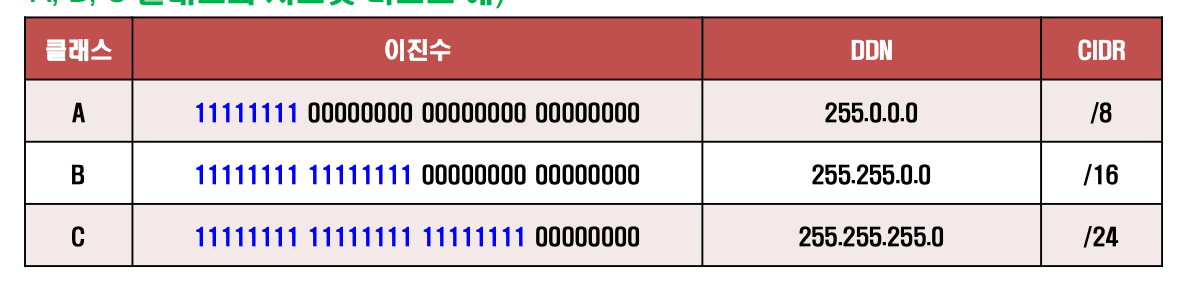
7. How to find which subnet an arbitrary IP belongs to
Problem: which subnet does 192.168.4.67/26 belong to?
Rule: AND the IP and the mask bit by bit and you get the Network ID
IP   192.168.4.67   11000000 10101000 00000100 01000011
Mask /26            11111111 11111111 11111111 11000000
                    ─────────────────────────────────── AND
NetID               11000000 10101000 00000100 01000000
                    = 192      168      4        64
8. Calculating the number of hosts
2^(remaining host bits) − 2.
Breaking down the 192.168.4.64/26 neighborhood:

Network ID address (the neighborhood's representative address): .64 (host bits all 0) (different from the network id; network id = 26)
Broadcast: .127(111111) (host bits all 1, 64+63)
Usable hosts: .65 ~ .126 = 62
9. IPv6, IPv4
IPv6
- Developed to solve the IP shortage problem and problems with the existing IP protocol
- Currently the IP shortage is being handled with methods such as private (virtual) IPs
- Extends the 32-bit IPv4 address to 128 bits, greatly increasing the number of addresses
- Address notation: 4 hexadecimal digits form one group, and 8 groups make up one address
- Designed to maximize compatibility with existing IPv4
5. Routing
1. Definition
Routing is deciding the fastest, most efficient path to send data, and the device that does it is the router
Static vs dynamic is split by who registers that path information
2. Static vs dynamic
| Category | Static Routing | Dynamic Routing |
|---|---|---|
| Path registration | Entered by hand by the administrator | Exchanged automatically between routers |
| Pros | Simple, zero overhead, predictable, better for security | Adapts automatically to network changes and failures, can reroute |
| Cons | Management hell as the network grows, manual response on failure | Protocol overhead (bandwidth, CPU), complex configuration |
| Best for | Small networks with fixed paths | Large networks that change often |
3. Routing table
Whether static or dynamic, a router looks at the "routing table" to decide which router to send to next.
The router matches the incoming packet's destination IP against the table's (NetID + mask) (the AND operation from earlier) and pushes it out the port leading to the matching neighborhood.
Components
- Destination network ID (which neighborhood)
- Subnet mask (where that neighborhood's boundary is)
- Interface or next hop address (so which port / to whom to throw it)
4. Dynamic protocols — RIP vs OSPF
Factors in path selection
- How many routers does it pass through?
- How long does it take to send the data to the destination?
- How much data can be sent at once?
- Which path can be used reliably?
- Is traffic excessively heavy at a particular moment?
RIP vs OSPF
| Category | RIP | OSPF |
|---|---|---|
| Method | Distance-Vector | Link-State |
| Path criterion | Minimum hop count (number of routers passed) | Minimum cost |
| Cost calculation | Considers hop count only | Based on link state: bandwidth, round-trip time, reliability, etc. |
| Exchange scope | Exchanges only with neighboring routers | Shares path information of all routers within the area |
| Path computation | Simple distance-vector method | Computes cost with a shortest-path algorithm |
| Limitations | Max 15 hops, 16 hops = unreachable | Heavy and complex, with computational burden |
Note
BGP (Border Gateway Protocol) is the protocol that connects ASes (autonomous systems) and runs the Internet backbone
IGRP is a Cisco proprietary protocol and is hardly used anymore.
6. Transport layer (TCP, UDP)
If the network layer so far was about "which computer to send to", the transport layer, on top of it, handles "which program on that computer to deliver to", and what points to that program is the port
1. Main functions
- Flow control: adjusts the sending rate to the rate the receiver can handle (so the receiver doesn't blow up)
- Error control: checks for missing or corrupted data and recovers it
- Congestion control: looks at network congestion and decides whether to send (so the network doesn't blow up)
2. Main protocols: TCP (connection-oriented), UDP (connectionless)
3. TCP(Transmission Control Protocol)
- Supports connection-oriented service (guarantees reliability, heavy, ex: a phone call (connect, then talk))
- Connection-oriented means: once the sending and receiving ports first establish a logical connection, data keeps flowing as a stream without breaking that connection
- Cuts the data from the application layer into blocks called segments and hands them to the IP layer
- The sending and receiving terminals are connected through a 3-phase process
Connection  →  Connection   →  Connection
establishment  maintenance     release
            (error/flow/
             congestion control)
1. Connection establishment
- Connects through the Three-Way Handshake
Three-Way Handshake process
- A SYN packet consists of | Src | Dst | Seq | Ack | Flag |.
- A SYN-ACK packet looks the same. The difference is that the receiving terminal sends it.
Example

① SYN      A→B   "Let's connect, my starting number is Seq=1200"
                 Seq=1200, Ack=0,    Flag=SYN

② SYN-ACK  B→A   "OK (= got your SYN), my starting number is Seq=4800"
                 Seq=4800, Ack=1201, Flag=SYN+ACK

③ ACK      A→B   "OK (= got your SYN-ACK), let's start"
                 Seq=1201, Ack=4801, Flag=ACK

Seq (1200, 4800) are values each side picks arbitrarily
Ack number = the Seq received from the other side + 1.
A's Seq is 1201 in ③ because in ② B said "give me 1201 next", so A matches it and sends 1201
- Why exactly 3 times
- After ①→②: A confirms "B received my signal" (A→B direction verified).
- After ②→③: B confirms "A received my signal" (B→A direction verified).
- So both directions must be confirmed before preparation for two-way (full-duplex) communication is complete
- What if ③ doesn't happen? B doesn't get A's final confirmation, so it retransmits the SYN-ACK after a timeout.
2. Connection maintenance
Common foundation
Meaning of the ACK number: ACK N means "I got everything up to N−1, so give me N next"
Sliding window (W). The number of segments that can be fired off at once without waiting for an ACK.
- With W=3, up to 3 can be sent in a row at once, and the window slides as ACKs come in
1. Error control
ACK-retransmission (Go-Back-N)
send DATA1,2,3  →  receive ACK2,ACK3,ACK4   ("got everything up to DATA 3")
send DATA4,5,6
   DATA5 is lost on the way ✗
   receiver: gets DATA4 → ACK5 ("give me 5 next")
             DATA6 arrives → but it was waiting for 5, so discard, ACK5 again
             DATA7 arrives → discard again, ACK5 again      ← duplicate ACK
sender: sees the second ACK5, "5 has a hole" → retransmits DATA5
   receiver: gets DATA5 → ACK6
- The receiver simply discards the out-of-order ones (6, 7)
2. Flow control (the receiver sets the speed)
- The receiver writes its free buffer size (= window size W) in the ACK packet and sends it. The sender doesn't fire more than that value.
- When the receiver's buffer fills up, it reduces W, writes it in the ACK packet and sends it → the sender slows down
3. Congestion control (the network sets the speed)
Gauges network congestion by how promptly ACKs arrive and adjusts W
Below is the order of congestion control
1. Algorithm: Slow Start
Starts with a small W and grows it exponentially (doubling) with each ACK received. Quickly probing how much the network will accept.
2. Algorithm: reaching the threshold
While growing exponentially, once it reaches the threshold it switches to Congestion Avoidance and grows carefully linearly (+1 at a time).
3. Timeout occurs (= packet loss = congestion signal)
W is dropped sharply and the threshold is also reset to about half. Then Slow Start again
4. Final W = min(flow control window, congestion control window)
The sender holds two windows — the flow control window set by the receiver, and the congestion control window set by the network.
The actual W is the smaller of the two. Why: to blow up neither the receiver nor the network, it has to follow the tighter constraint
3. Connection release
Done with the Four-Way Handshake
① FIN  sender→receiver   "I'm done sending, let's disconnect"
② ACK  receiver→sender   "Got it" (and waits until its own communication is finished)
③ FIN  receiver→sender   "I'm all done too, let's disconnect"
④ ACK  sender→receiver   "Got it"
- Why 4 times
- When A says "I'm done (FIN)", B immediately sends "got it (ACK)" first — but B may still have data left to send, so FIN and ACK have to be sent separately, which makes it 4 steps
4. UDP
- Connectionless
- If TCP is a phone call, UDP is a loudspeaker broadcast
- The header structure is much simpler, and it does no error control, flow control or congestion control at all.
- So reliability is low, but it is fast and light
- Uses: video streaming, DNS, NTP (time servers), control signals.
5. TCP vs UDP
| Item | TCP | UDP |
|---|---|---|
| Service | Connection-oriented | Connectionless |
| Receive order | Guaranteed to match the send order | May be reordered |
| Error / flow / congestion control | Yes | Almost none |
| Speed / overhead | Slow and heavy | Fast and light |
| Uses | Web, file transfer | Streaming, DNS, control signals |
7. Wireless networks
1. Two axes of network classification
- By transmission path: wired vs wireless
- By size: LAN (building, campus) < MAN (city) < WAN (wide area, country)
Wireless network is the general term for networks that communicate by radio waves, and the types are Ad-Hoc / WMN / WSN.
2. AD-Hoc Network (terminal to terminal, without infrastructure)
- Made up only of mobile communication devices, without infrastructure (routers, APs)
- There is no distinction between nodes and terminals. Every terminal acts as a relay at the same time. So data can be delivered even to a distant terminal via the neighboring terminals → overcomes communication range limits.
- Everything is wireless, so communication is guaranteed even while moving.
The opposite of an AD-Hoc network: Infrastructure network
Centered on APs and base stations, so terminals must always go through an AP to communicate — home and office WiFi is this
Ad-Hoc routing — Table-Driven vs On-Demand (trade-off)
| Category | Table-Driven (Proactive) | On-Demand (Reactive) |
|---|---|---|
| Path discovery | Periodically maintains all path information in advance | Searches for a path only when needed |
| Pros | Paths are ready, so transmission delay is small | Low routing overhead |
| Cons | Large overhead from periodic broadcasts | Initial delay when searching for a path |
If nodes move often, the topology changes frequently and communication is sporadic, On-Demand
Conversely, if communication is frequent and immediacy matters, Table-Driven, which lays paths down in advance, is better
3. WMN (Wireless Mesh Network) — mesh backbone.
- Only the main AP (gateway) is connected to the Internet by wire, and the rest of the wireless routers become mesh nodes and spread the network by connecting to each other wirelessly over multiple hops
- The approach used when rolling out citywide WiFi
4. WSN (Wireless Sensor Network) — sensor collection network.
- Sensor nodes capable of wireless communication measure phenomena like temperature, sound and pressure and send them to the main node (Sink Node).
- A structure where the Sink Node aggregates and interprets the data, connects to the Internet and sends it out
- Applications: enemy intrusion alerts, detecting air pollution, wildfires and landslides.
- Technologies: ZigBee, 6LoWPAN (IPv6 over Low-power WPAN), IoT.