
- Published on
CH7. Data Link Control Protocols
- Authors

- Name
- seren-wib
Contents
- 0. Glossary
- 1. Introduction: data link control protocols
- 1. Frame synchronization
- 2. Flow control
- 3. Error control
- 4. Addressing
- 5. Control and data
- 6. Link management
- 2. Flow Control
- Cause
- Why split data into frames instead of sending the whole data block?
- 1. Stop-and-Wait Flow Control
- 2. Sliding Windows Flow Control
- Sliding Window operation example
- ① Initial state
- ② A sends F0, F1, F2
- ③ B receives F0, F1, F2 and sends RR3
- ④ A receives RR3
- ⑤ A sends F3~F6 → B receives → RR reply (repeat)
- 3. Error Control Techniques
- Error situations that need error control
- 1. Error detection
- 2. Positive acknowledgment
- 3. Retransmission after timeout
- 4. Negative acknowledgment and retransmission
- 4. ARQ(Automatic Repeat Request)
- 1. Stop-and-Wait ARQ
- Case 1. Normal operation
- Case 2. The received frame is a damaged frame
- Case 3. The frame arrived fine but the ACK was damaged or lost
- Stop-and-Wait ARQ operation example
- Meaning of ACK numbers
- Step-by-step flow
- Key summary
- 2. Go-Back-N ARQ
- 3. Selective-Reject ARQ
- 5. HDLC(High Level Data Link Control)
- 1. Station: a device (node) participating in communication
- 2. Link: the connection (line) joining those stations
- 3. HDLC frame structure
- 4. HDLC-2
- I-frame
- S-frame
- U-frame
- Bit Stuffing
- Address field
- FCS(Frame Check Sequence)
- 0. Glossary
- 1. Introduction: data link control protocols
- 2. Flow Control
- 3. Error Control Techniques
- 4. ARQ(Automatic Repeat Request)
- 5. HDLC(High Level Data Link Control)
0. Glossary
Propagation time: the time it takes one bit to travel along the line from the sender to the receiver Transmission time: the time it takes to push all the bits of a frame onto the line ACK(Acknowledgement): the receiver's response saying it received the data NAK: a negative response the receiver sends saying "I didn't get this properly, send it again". The negative version of ACK REJ(Reject): a specific form of NAK used in HDLC and Go-back-N
1. Introduction: data link control protocols
A set of rules that lets two directly connected devices exchange data frame by frame, safely and in an orderly way
1. Frame synchronization
Aligning frame boundaries
Given data like 010100/101101/001001, cutting it to say "this much is one frame"
2. Flow control
Keeping the sender from sending more data than the receiver can handle
Because if the sender just blasts data out fast, a buffer overflow can occur
3. Error control
Rules for what to do when a frame is damaged
Raises reliability by detecting errors, getting responses like ACK or NAK, and retransmitting when needed. ARQ, covered later, belongs here
4. Addressing
Indicating who sent it and who will receive it
It may look less important on point-to-point links, but it matters on links shared by many devices
5. Control and data
Distinguishing control information from actual data
Because when data is transmitted, the actual data and control information are sent together
Control information: address, sequence numbers, FCS for error checking, ACK information, etc.
Actual data: the actual data the user sends
6. Link management
Procedures for setting up, maintaining and releasing the link
Checking that nothing is getting in the way of communication. More of a preparation step than something directly tied to the communication itself.
2. Flow Control
A technique that keeps the sender from sending data beyond the receiver's processing capacity
Cause
- buffer: space that temporarily stores received data. The receiver checks whether the frame arrived intact, checks the order, interprets the necessary control information, and then passes it to the upper layer
The sending side can push frames in quickly, but the receiving side has to store them in the buffer, check them and pass them up to the upper layer, so it takes time
And this buffer is limited.
If the buffer is full and the sender keeps pushing data in, an overflow occurs.
The overflowing data is lost.
Why split data into frames instead of sending the whole data block?
- The receiver's buffer size
- The cost of errors and retransmission
- The longer the frame, the higher the chance that any single bit in it gets corrupted. And since error checking is done per frame, if one long frame is corrupted, that entire long frame has to be resent. Conversely, if it's split into several small frames, only the frames with errors need to be resent.
- Fairness on a shared medium
- When several devices share the same medium, if one device keeps holding on and sending a huge data block, the other devices have to wait. So it's better to cut it into small frames so that one station can't occupy the medium too long. That way the other senders also get transmission opportunities in between.
1. Stop-and-Wait Flow Control
Send one frame and wait until the ACK arrives
- Drawback
- After sending one frame, the link can sit idle until the ACK comes back. Especially when the distance is long and the propagation delay is large, the waiting time can exceed the actual data transmission time. That's where the link utilization problem comes from.
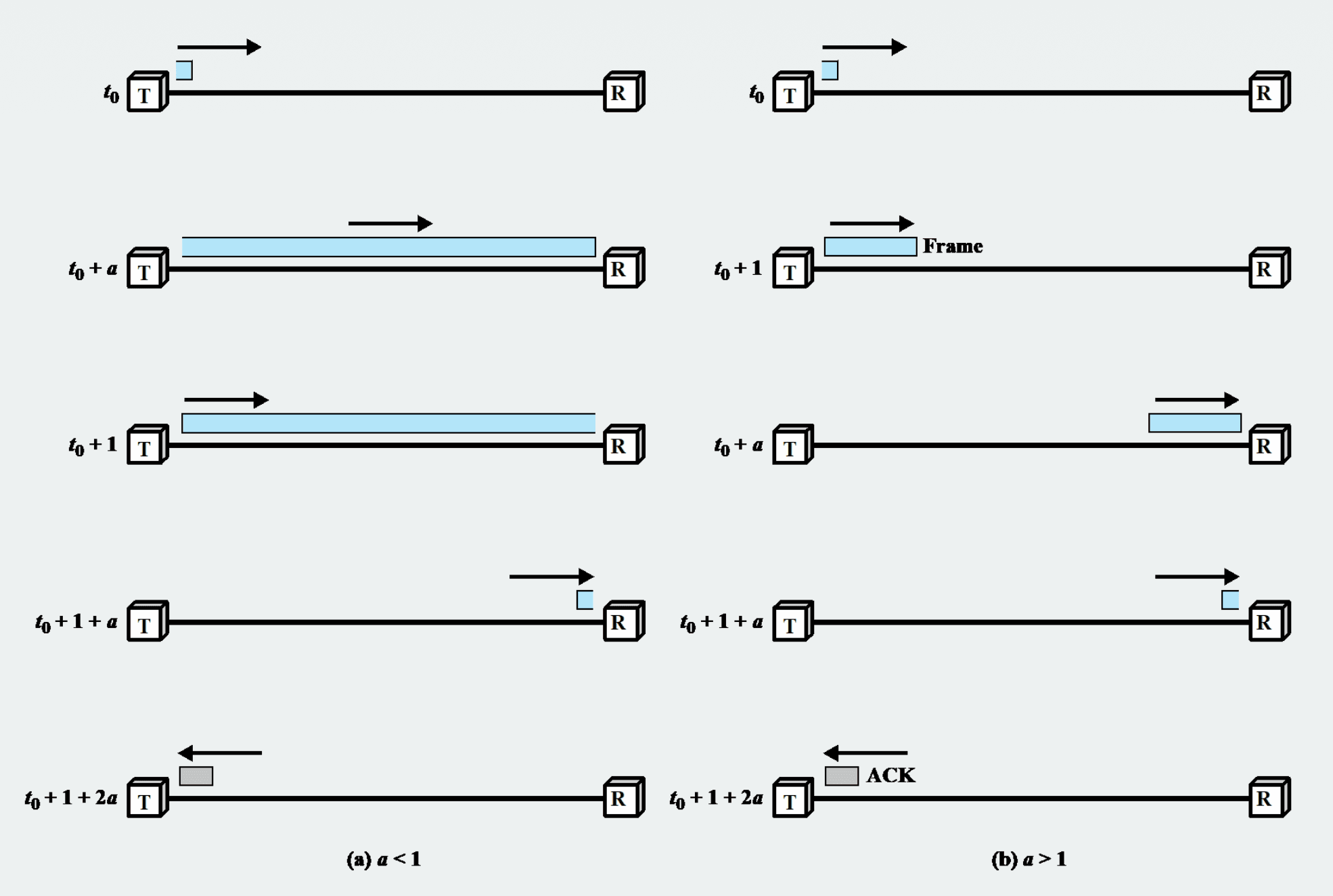
- T: sender
- R: receiver
- a: propagation delay
- 1: Transmission time
- Blue bar: Frame
- Gray bar: ACK
In Stop-and-Wait Flow Control, total time = t0 (reference time) + 1 (Transmission time) + 2a (propagation delay).
So link utilization drops.
a = propagation time / transmission time
U = 1 / (1 + 2a)
- The smaller a, the better, because utilization goes up as it gets smaller
If a is less than 1, efficiency is good; if it's greater than 1, efficiency is poor
2. Sliding Windows Flow Control
Lets multiple frames be sent in a row even while waiting for ACKs
- The receiver has a buffer that can store up to about W frames
- The sender can send up to W frames in a row even before receiving an ACK
- W: the size of the receiver's buffer. Up to W frames of data can be sent without an ACK
- The ACK carries the number of the frame it wants next
- The field for the frame number is limited to k bits
- With k bits there are 2^k possible numbers. (ex: k=3, possible frame numbers: 0,1,2,3,4,5,6,7,0,1,2,3,4,5,6,7...)
- The window size is limited to 2^k-1.
- There are two windows: the send window and the receive window
- If the window were 2^k or more, frame numbers of the previous and next windows would overlap, so when an ACK is lost, a retransmitted frame couldn't be told apart from a new frame
- When its buffer is nearly full or it needs processing time, the receiver can acknowledge what has been sent so far but ask the sender not to send any more data.
- Once ready, it has to respond asking for data to continue.
- If the link supports full-duplex, ACK information can be carried inside the data frame sent to the other side. This is called a piggyback ACK.
Sliding Window operation example
A sliding window flow that works normally without errors.
- A = sender (TX), B = receiver (RX)
- Frame numbers: cycle 0~7 (k=3, modulo 8)
- Window size: 7 (blue cells = current window)
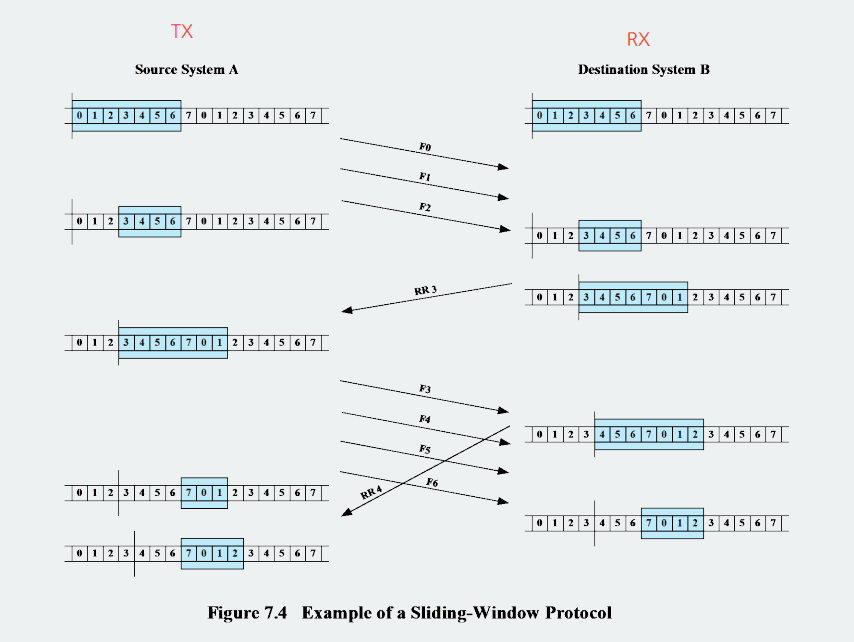
① Initial state
A: [0 1 2 3 4 5 6] 7 ...   ← can send 0~6
B: [0 1 2 3 4 5 6] 7 ...   ← can receive 0~6
② A sends F0, F1, F2
Three were sent, so the window's trailing edge (back) shrinks. Sent frames are kept in the buffer until the ACK arrives.
A: 0 1 2 [3 4 5 6] ... ← window shrinks to 3~6
③ B receives F0, F1, F2 and sends RR3
The window shrinks by the amount received, and the leading edge (front) expands as the ACK is sent. RR3 = "got 0,1,2 fine, expecting 3 next" (cumulative acknowledgment)
B: 0 1 2 [3 4 5 6 7 0 1] ...
        → sends RR3 to A
④ A receives RR3
ACK arrives → A's window expands forward and fills 7 slots again.
A: 0 1 2 [3 4 5 6 7 0 1] ...
⑤ A sends F3~F6 → B receives → RR reply (repeat)
final A: 0 1 2 3 4 5 6 [7 0 1 2] ...
final B: 0 1 2 3 4 5 6 [7 0 1 2] ...
3. Error Control Techniques
How to recover when a frame isn't delivered properly?
Error situations that need error control
- Lost frame: the frame never reaches the other side at all
- Damaged frame: the frame does arrive, but some bits have errors
1. Error detection
The receiver checks whether the frame has errors
- FCS and CRC belong here
2. Positive acknowledgment
The receiver checks whether the frame has errors
3. Retransmission after timeout
Retransmit if the ACK doesn't arrive within a set time
4. Negative acknowledgment and retransmission
Send a NAK/REJ for an erroneous frame and request retransmission
Automatic Repeat Request(ARQ): an error control method that combines the elements above to retransmit frames that had errors
4. ARQ(Automatic Repeat Request)
An error control method that ensures reliability by automatically retransmitting a frame when an error occurs or an ACK doesn't arrive
The purpose of ARQ is to make an unreliable data link look like a reliable data link.
That is, errors don't disappear from the link itself; when an error occurs it is detected and the frame is resent, so delivery ends up correct.
1. Stop-and-Wait ARQ
Case 1. Normal operation
- The sender sends one frame and waits until the ACK arrives.
- When the ACK arrives normally, it sends the next frame.
Case 2. The received frame is a damaged frame
- If the frame the receiver got is a damaged frame, the receiver discards it.
- Then the sender doesn't receive an ACK.
- The sender doesn't wait forever; it sets a timeout.
- If no ACK arrives within the timeout, it assumes "something went wrong" and sends the same frame again.
Case 3. The frame arrived fine but the ACK was damaged or lost
- The frame arrived fine, but the ACK was damaged or disappeared.
- Then, from the sender's point of view, it can't recognize an ACK, so it sends the same frame again after the timeout.
- The problem is that the receiver has already received that frame once. A duplication problem, with the same frame arriving twice, should occur, so why doesn't it?
- It doesn't, because frames are numbered with alternate numbering
Example
The sender sent Frame 0, and the receiver received it fine and sent an ACK.
But the ACK got corrupted on the way.
The sender didn't get the ACK, so it resends Frame 0 after the timeout.
The receiver looks at the frame's number, decides "ah, this is frame 0, which I already received", and instead of passing the data up to the upper layer again, it just resends the ACK.
Stop-and-Wait ARQ operation example
The flow for recovering when a frame/ACK is lost.
- A = sender, B = receiver
- Time flows top → bottom
- ACK numbers are used alternating between 0/1
Meaning of ACK numbers
| ACK | Meaning |
|---|---|
| ACK1 | "expecting 1 next" = got 0 fine |
| ACK0 | "expecting 0 next" = got 1 fine |
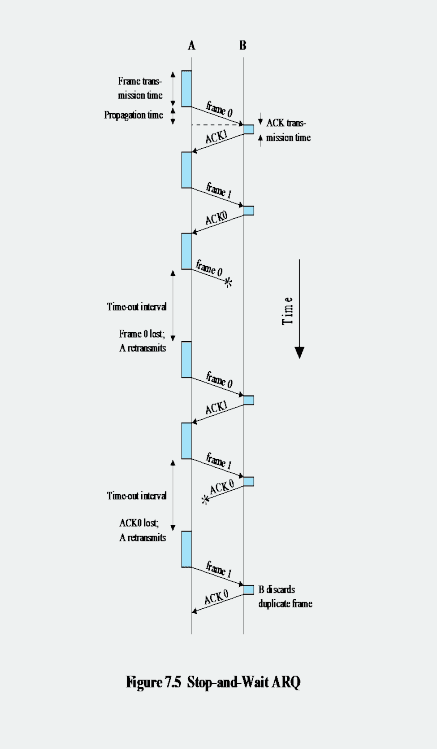
Step-by-step flow
① Normal operation
A --- frame 0 ---> B    (frame transmission time + propagation time)
A <--- ACK1 ------ B    (got 0, expecting 1 next)
A --- frame 1 ---> B
A <--- ACK0 ------ B    (got 1, expecting 0 next)
One frame → receive ACK → next frame. The basic stop-and-wait operation.
② Frame loss
A --- frame 0 --✕       (lost on the way)
   ⋮ Time-out interval   (A doesn't receive an ACK)
   "Frame 0 lost; A retransmits"
A --- frame 0 ---> B     (retransmitted after timeout)
A <--- ACK1 ------ B
If the ACK doesn't arrive, A waits until the timeout and retransmits the same frame. It doesn't detect frame loss directly; it infers it indirectly from "the ACK isn't coming".
③ ACK loss (key point)
A --- frame 1 ---> B     (B receives it fine)
A      ✕--- ACK0 -- B    (ACK0 is lost on the way)
   ⋮ Time-out interval
   "ACK0 lost; A retransmits"
A --- frame 1 ---> B     (A retransmits frame 1)
                   B     "B discards duplicate frame" → retransmits ACK0
If the ACK disappears, A thinks it failed and sends frame 1 again → from B's point of view it's a duplicate. B looks at the number, thinks "this is the 1 I got earlier", and discards it.
Key summary
Loss is detected only through timeout
- Whether the frame dies or the ACK dies, to A it's the same: "the ACK isn't coming"
- → once the timeout passes, it always retransmits
ACK loss creates duplicate frames
- This is solved with alternating ACK0 / ACK1 numbers
- The receiver uses the number to tell "new frame vs retransmitted duplicate" → duplicates are discarded
One-line summary: both frame loss and ACK loss are recovered through timeout, and the duplicates created by ACK loss are filtered out with the 0/1 numbers.
2. Go-Back-N ARQ
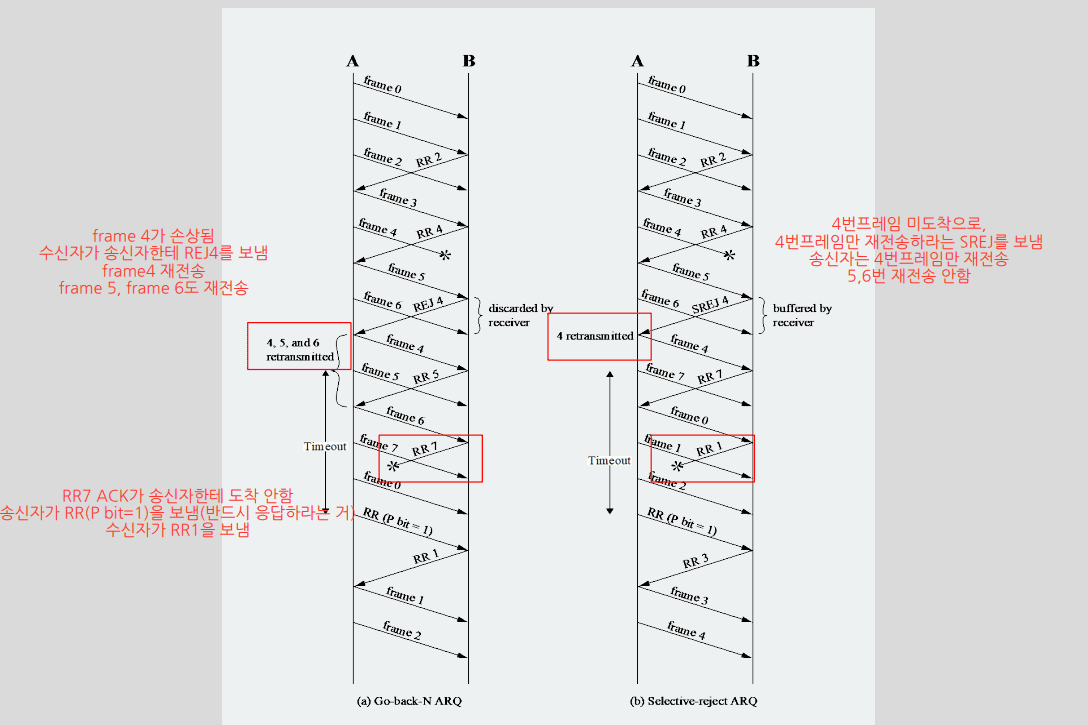
A Sliding Window-based ARQ. Multiple frames are sent in a row, and when an error occurs, the erroneous frame and all frames after it are retransmitted
- The most commonly used.
- More efficient than Stop-and-Wait ARQ.
- Because multiple frames can be sent even while waiting for an ACK.
- The receiver sends RR (Receive Ready) for frames received correctly.
- RR n: means it expects frame n.
- When the receiver finds an erroneous frame, it sends REJ (Reject).
- REJ n: means resend starting from frame n.
- Frames arriving after the erroneous frame are discarded.
- Because the order is broken.
- The sender retransmits the erroneous frame and the frames after it.
Example:
The sender sent Frames 0,1,2,3,4,5.
The receiver received 0,1,2 fine but found an error in 3.
The receiver sends REJ 3.
4 and 5, which arrive afterwards, are discarded.
The sender resends starting from Frame 3.
3. Selective-Reject ARQ
An ARQ method that selectively retransmits only the erroneous frame
- Unlike Go-Back-N, correct frames arriving after the erroneous frame are not discarded but stored in the buffer.
- The sender retransmits only the erroneous frame.
- Less retransmission waste.
- The receiver must store out-of-order frames, so it needs enough buffer.
- The sender has to resend only specific frames, so the logic is more complex.
- Useful on satellite links with long propagation delay.
Example:
If Frame 4 has an error and Frames 5,6 arrive fine,
Go-Back-N discards 5,6 and receives again from 4.
Selective-Reject stores 5,6 in the buffer and receives only 4 again.
5. HDLC(High Level Data Link Control)
"A bit-oriented standard protocol that implements all the data link layer requirements (framing, flow, error, addressing), and the prototype of later protocols
Station/link are the premises that define "in what environment, and who to whom" HDLC operates
1. Station: a device (node) participating in communication
Classified by: who has control in this communication.
- Primary: the side that leads the communication
- Secondary: the side that responds as the Primary directs
- Combined: both leads and responds (peers)
2. Link: the connection (line) joining those stations
Unbalanced: 1 primary + several secondaries (a master-slave structure where one directs many)
Balanced: 2 combined stations (the two as equals)
3. HDLC frame structure
frame format

| Flag | Address | Control | Information | FCS | Flag |
   8      8/16     8/16      variable     16/32   8     (bit)
- Flag: always 01111110, a boundary marker signaling the start and end of a frame
- Address: identifies the receiving/sending secondary
- Control: holds control information (differs for I frame, S frame, U frame)
- Information: the actual data
- FCS: error detection code
I-frame, S-frame and U-frame are the types of HDLC frames as a whole
Which frame it is can be determined by looking at the control field
4. HDLC-2
- N(S): send sequence number (the number of the frame I'm sending)
- N(R): receive sequence number (the number expected next = cumulative ACK)
- P/F: Poll/Final bit (requests a response / marks the last one)
- The type is determined by the first bit(s) — 0 means I, 10 means S, 11 means U
I-frame
- Has an Information Field
- Variable length


S-frame


U-frame
- Some have an information field

Bit Stuffing
Problem: the Flag is 01111110 (six 1s), so if six 1s happen to appear in a row in the data, the receiver mistakes it for "oh, the frame ended?"
Solution: whenever five consecutive 1s appear in the data, the sender always forcibly inserts a 0
Address field
- Identifies the secondary station
- Usually 8 bits; if that's not enough, it can be extended in multiples of 7 bits
- When extended, the leftmost bit of each octet indicates "is this the last octet" — 1 means last, 0 means more follow
- 11111111 is the broadcast address — used when the primary sends to all secondaries at once
FCS(Frame Check Sequence)
- An error detection code computed over all bits except the Flags
- The default is 16-bit CRC-CCITT
- If frames are long or the line is unstable, there is a 32-bit CRC-32 option