
- Published on
schedule
- Authors

- Name
- seren-wib
Contents
- 1. Purpose of CPU scheduling
- 2. Goals of scheduling
- 1. There should be no starvation.
- starvation: a process is ready to run, but the scheduler never gives it a chance, so it never runs and just sits ready
- 2. batch system
- 3. Interactive system
- 4. Real-time system
- 3. Basic concepts
- 1. non-preemptive vs preemptive
- 2. cpu-bound vs I/O-bound
- 4. State queue flow
- 5. Four scheduling algorithms
- 1. FCFS/FIFO
- 2. SJF(Shortest Job First)
- 3. SRTF(Shortest Remaining Time First)
- 4. RR(Round Robin)
- 6. Priority Scheduling
- Problems with Priority Scheduling
- 1. Starvation
- 2. Priority inversion
- Solutions
- 7. Multilevel Queue Scheduling
- foreground
- background
- Scheduling between queues
- 8. MLFQ(Multilevel Feedback Queue)
- Difference from the multilevel queue
- Flow
- 9. UNIX scheduler
- 10. Scheduling on multiprocessors
- 11. NUMA(Non-Uniform Memory Access)
- 1. Purpose of CPU scheduling
- 2. Goals of scheduling
- 3. Basic concepts
- 4. State queue flow
- 5. Four scheduling algorithms
- 6. Priority Scheduling
- 7. Multilevel Queue Scheduling
- 8. MLFQ(Multilevel Feedback Queue)
- 9. UNIX scheduler
- 10. Scheduling on multiprocessors
- 11. NUMA(Non-Uniform Memory Access)
1. Purpose of CPU scheduling
- Pick which of the runnable processes to put on the CPU next
- It happens often, so it has to be fast.
2. Goals of scheduling
Don't play favorites with jobs, keep working without rest, get a lot done, meet schedules, and process things fast.
1. There should be no starvation.
- fairness: every process should get equal access to the CPU
- Balance: not just the CPU, every device should be kept busy.
starvation: a process is ready to run, but the scheduler never gives it a chance, so it never runs and just sits ready
- Caused by a bad scheduler or by synchronization.
2. batch system
- Submit jobs all at once and let the system process them in order
- throughput: do as many jobs as possible per hour
- Turn around time: reduce the time from when a job is submitted until it's completely done
- CPU utilaization: keep the CPU working all the time.
3. Interactive system
- A system where the user types input directly and waits for a response
- response time: must respond as quickly as possible
4. Real-time system
- Must not go past the deadline
- Job execution time must be predictable.
3. Basic concepts
1. non-preemptive vs preemptive
- non-preemptive: call yield and give up the CPU voluntarily
- Here, even if a higher-priority one arrives later, this process finishes completely first and then the next process is taken
- preemptive: give up the CPU on an interrupt
- Problem: what if an interrupt arrives while modifying shared data? While in a system call?
- Synchronization problems come along with it (shared data and kernel state can be corrupted)
- Here, if a higher-priority one arrives, context switch immediately
2. cpu-bound vs I/O-bound
cpu bound: long CPU bursts (holds the CPU for long stretches) I/O bound: short CPU bursts + frequent I/O waits (uses the CPU briefly, then drops out for I/O) I/O-bound is more responsive
- In practice, the time processes actually hold the CPU is short.
4. State queue flow
From the Running state
├─ time slice expired
│  └─ used the CPU too long, forced off
│     → moves to the Ready Queue
│
├─ I/O request
│  └─ disk read, network request, etc.
│     → moves to the Waiting Queue until the I/O finishes
│     → I/O completion interrupt
│     → back to the Ready Queue
│
├─ wait()
│  └─ waits for an event like a child process exiting
│     → moves to the Waiting Queue
│     → child exits
│     → back to the Ready Queue
│
└─ exit
   └─ execution finished
      → Terminated
5. Four scheduling algorithms
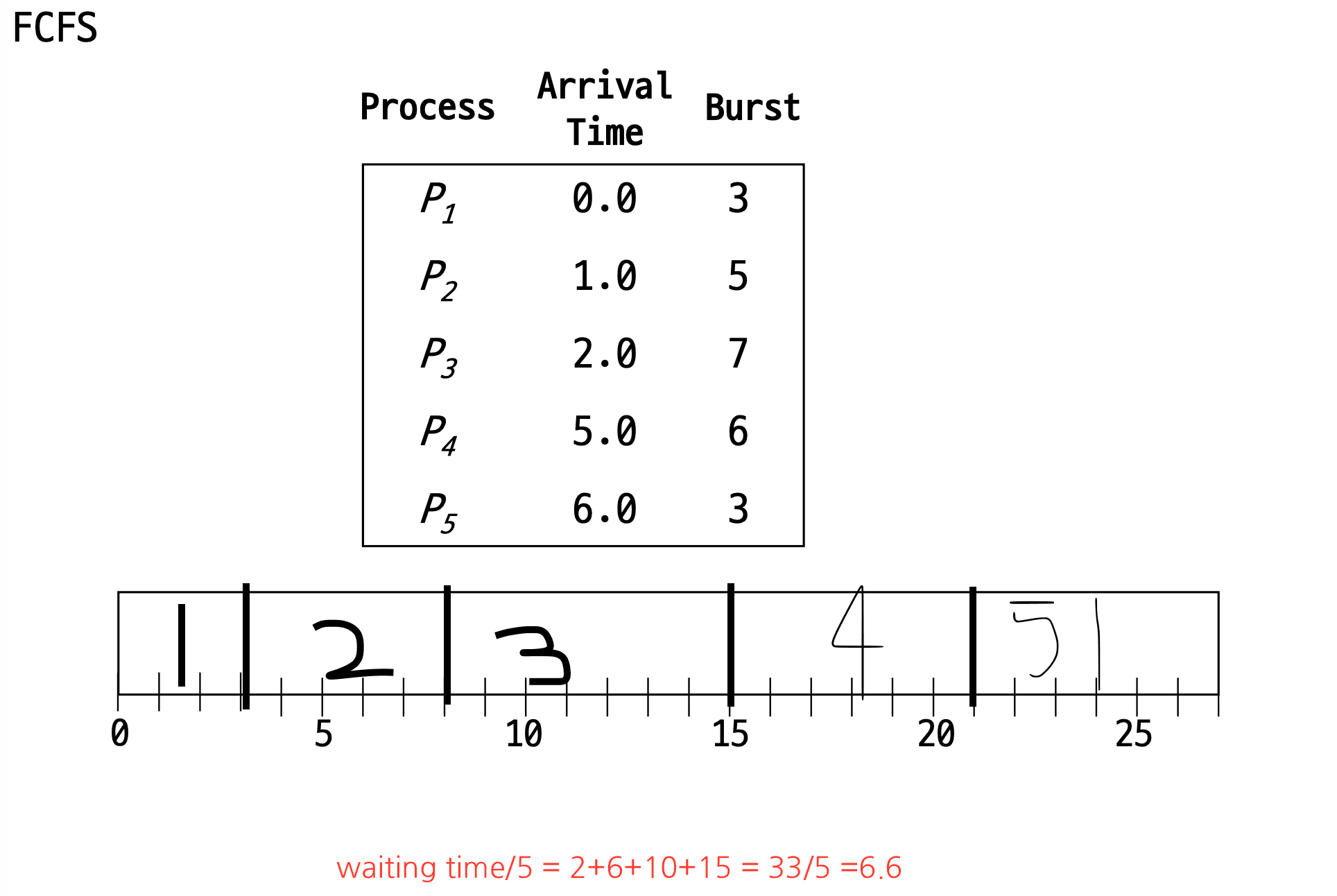
1. FCFS/FIFO
- Run in the order of arrival in the ready queue.
- Mostly non-preemptive (if P2 arrives while P1 is running, it waits until P1's work is done)
- Pros: simple to implement
- Cons: waiting time can get long (if a process with a long CPU burst arrives first, it runs first no matter how short the processes that arrive later are), it's a problem when the CPU does long I/O in the middle
2. SJF(Shortest Job First)
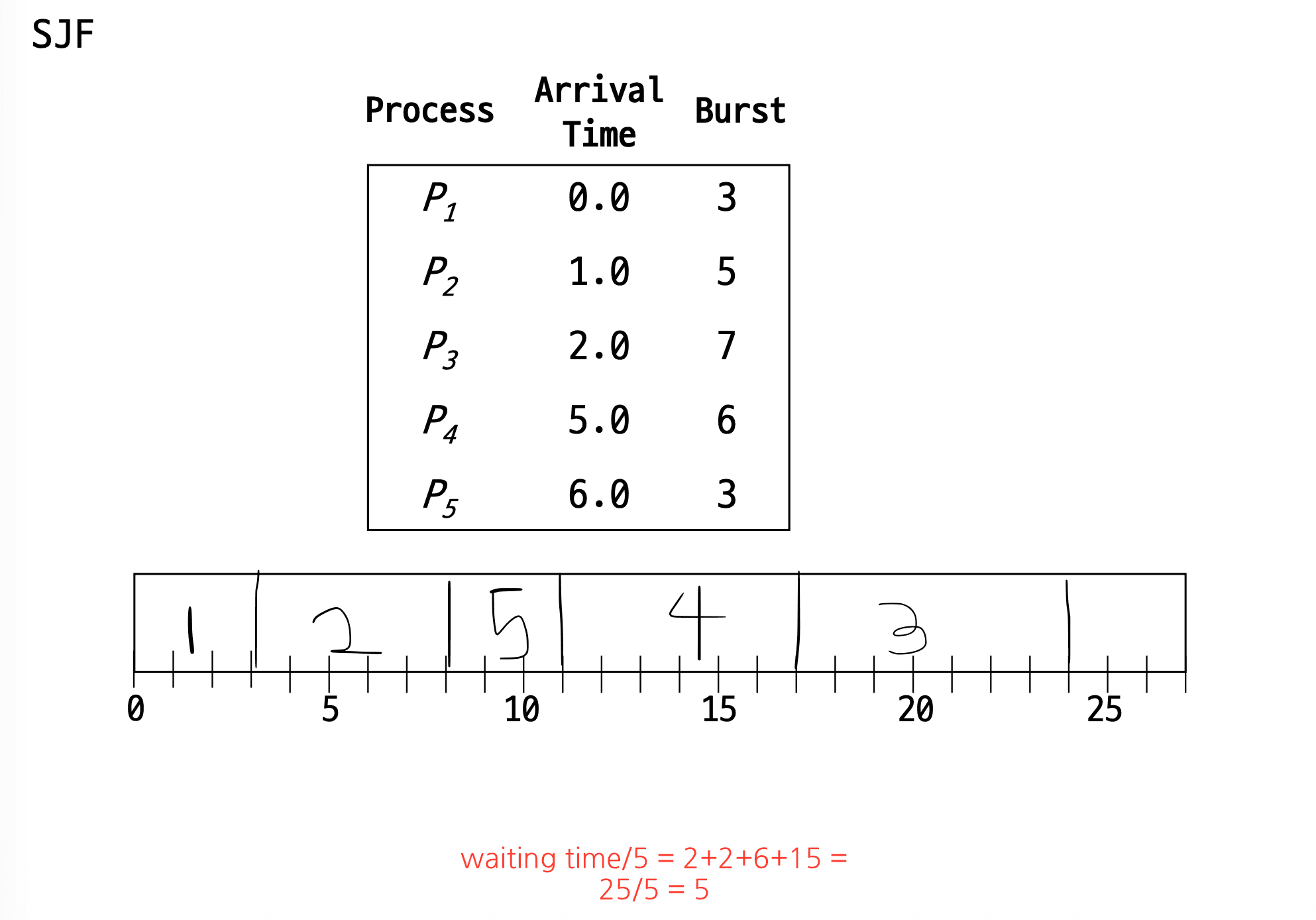
Run first the process expected to have the shortest CPU burst
- Goal: reduce average waiting time
- Condition: when all jobs are available at once (all processes are already in the ready queue and their burst times are known)
- Mostly runs non-preemptively
- Problems: future CPU burst times can't be known (so they're predicted from past patterns), starvation can occur
3. SRTF(Shortest Remaining Time First)
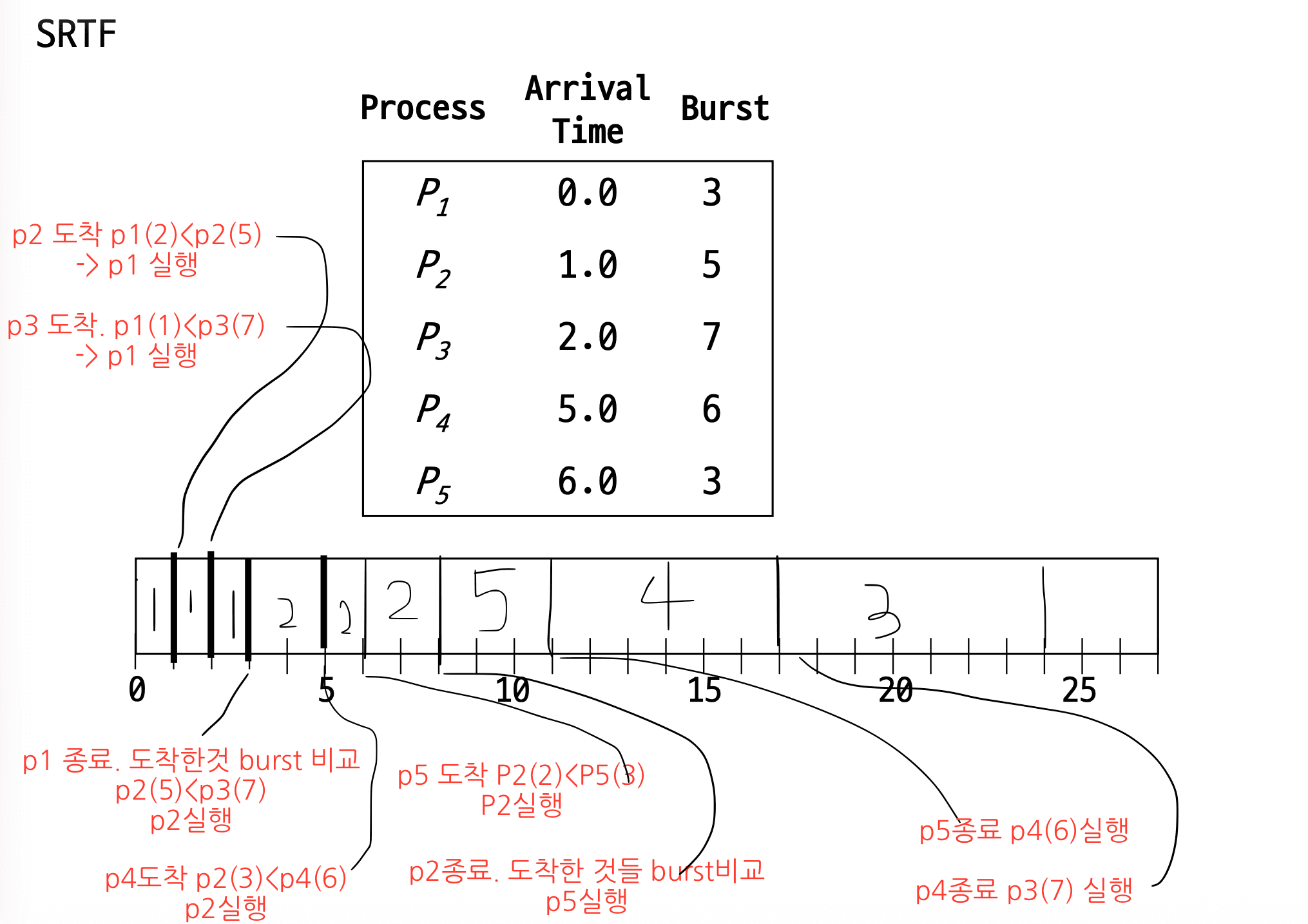
- The preemptive version of SJF
- How is it different? In SJF with T1(arrival = 0, burst time = 5), T2(arrival = 2, burst time = 2),
- T1 runs to completion even after T2 arrives, then it moves on to T2
- In SRTF, when T2 arrives it compares the two burst times (T1:3, T2:2): T2 is shorter? It can switch to T2. Why: because it's preemptive.
4. RR(Round Robin)
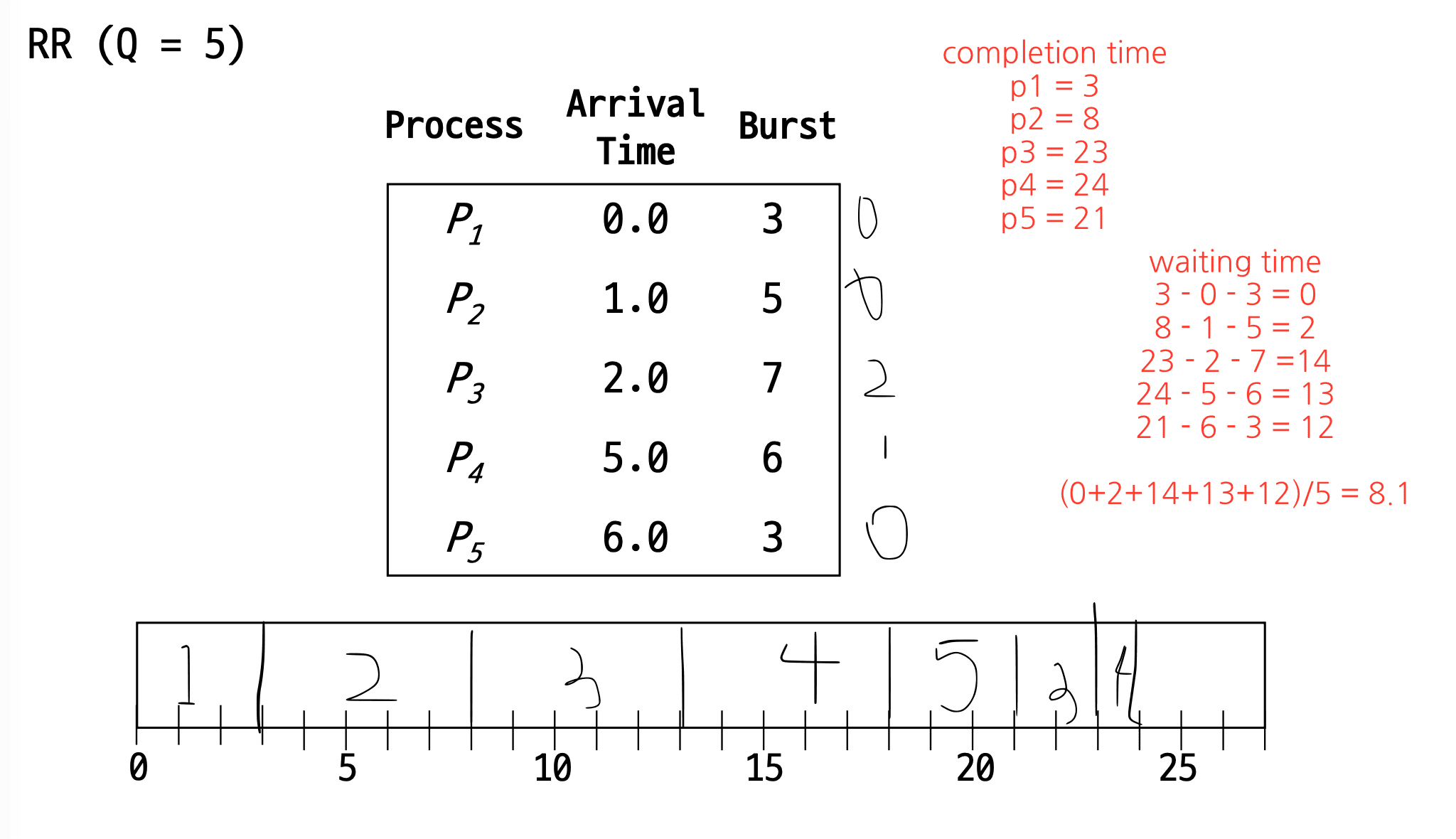
Hand out the CPU in turns, one time quantum at a time An improved version of FIFO that treats the ready queue as a circular queue.
- Preemptive
6. Priority Scheduling
Pick and run the process with the highest priority among the processes in the ready queue
- SJF and SRTF are kinds of this too (shorter burst = higher priority)
- If prority is equal, FIFO or RR can be applied
- Both non-preemptive and preemptive are possible
- Priority can change dynamically (e.g. raise the priority of processes that waited long, lower the priority of processes that used a lot of CPU)
- This leads to MLFQ (Multilevel Feedback Queue).
Problems with Priority Scheduling
1. Starvation
- Solution: Aging: raise the priority of old processes, lower the priority of CPU hogs
2. Priority inversion
- Priority: P1 > P2 > P3
- P1 and P3 both need to enter the same critical section
- But P3 enters the critical section first and grabs the lock
- Then P2 shows up
- P2 has higher priority than P3, so P2 runs first
- P3 can't release the lock, the lock stays held, so P1 can't run
Solutions
- PIP
- Raise the priority of the low-priority job
- In the example above, raise P3's priority so P3 finishes quickly, then run P1 next
- PCP
- Each resource has a priority ceiling value set in advance
- When a thread locks that resource
- it is immediately raised to that ceiling priority
7. Multilevel Queue Scheduling
Assign processes permanently to a queue by type, and apply a different algorithm per ueue
- Why separate them? Because different jobs want different goals
foreground
- interective jobs
- response time matters, must respond quickly
- ex: terminal, editor, gui, handling user input
- Algorithm: RR
background
- batch jobs
- throughput and turnaround time matter, what counts is processing a lot and finishing
- ex: large computations, log processing, long-running jobs
- Algorithm: FCFS
Scheduling between queues
Fixed priority scheduling: process all of foreground first, then background
- Problem: starvation
A figure showing "a structure that stacks several queues in priority order and gives the CPU starting from the top queue"
So if the queues are separated outright, there's less overhead in figuring out who has higher priority
8. MLFQ(Multilevel Feedback Queue)
The multilevel queue with the aging technique applied at the queue level
Difference from the multilevel queue
Multilevel Queue: a process is fixed to one queue
Multilevel Feedback Queue: a process moves between queues depending on its execution pattern
Flow
→ start by running at high priority
→ if it uses the CPU for long, move it down
→ if it uses it briefly and does I/O, keep it up

And raise the priority of queues that haven't run for a long time
the aging technique
9. UNIX scheduler
preemptive + priority-based + round-robin + dynamic priority + MLFQ
- Preemptive: if a higher-priority process arrives, it can cut off the current process
- Priority-based: run high-priority processes first
- Round-robin: within the same priority, take turns by time slice
- Dynamic priority
- Using a lot of CPU lowers priority
- I/O-bound or interactive processes get favored priority
- Similar to MLFQ: priority changes based on process behavior
- Aging: prevents starvation of processes that waited long
10. Scheduling on multiprocessors
So far we've only covered the single-CPU case; how should we schedule when there are several CPUs?
P1, P2, P3, P4
CPU0, CPU1, CPU2, CPU3

→ P1 on CPU0?
→ P2 on CPU1?
→ Or give each CPU its own queue?
→ What if work piles up on one CPU?
- load balance: split the workload among CPUs appropriately so that no CPU sits idle while another is busy
- process affinity: when possible, the same process should run on the same CPU. Because of the cache
11. NUMA(Non-Uniform Memory Access)
Memory access time is not uniform
- Where is the physical memory located? The design has to take even this into account
- Multithreaded multicore is a structure that puts several hardware threads on one core to use it more efficiently, and the scheduler has to account for the fact that a logical CPU isn't truly an independent CPU.