
- Published on
memory
- Authors

- Name
- seren-wib
Contents
- 1. Goals of memory management
- 2. Single / Batch Programming
- 3. Multiprogramming
- virtual address vs physical address
- 4. Ways to load multiple processes into memory (old-style)
- 1. Fixed Partitions
- Advantages
- Disadvantages
- The improved version that followed
- 2. Variable Partitions
- Allocation strategies
- Advantages
- Problems
- Solutions to external fragmentation
- 3. Overlays
- Advantages
- Disadvantages
- Example: two-pass assembler
- 4. Swapping
- Flow
- Backing store
- Problems
- 5. Virtual Memory
- 1. Core concept
- 2. Why is it needed?
- 3. Address translation flow
- 4. Virtual Address Space
- 5. Lazy Loading
- 6. Advantages
- 7. Disadvantages
- 8. Implementation methods
- 1. Goals of memory management
- 2. Single / Batch Programming
- 3. Multiprogramming
- 4. Ways to load multiple processes into memory (old-style)
- 5. Virtual Memory
1. Goals of memory management
- Provide abstractions that are convenient to program with (like arrays)
- Distribute scarce memory resources among multiple processes
- Maximize performance with minimal overhead
- Provide isolation between processes
- So why is this hard?
2. Single / Batch Programming
- The days when only one process was loaded into memory and run
- Programs used actual RAM addresses (physical addresses) directly
- Only one user program is in memory at a time
3. Multiprogramming
When multiple processes are loaded into memory at the same time, processes must not invade each other's memory regions, so we need Protection so each uses only its own region. Also, processes use addresses constantly, so if address translation is slow the whole process slows down. So we need something that quickly converts virtual > physical (fast translation). Also, the memory settings must be switched quickly on a context switch (fast context switch).
virtual address vs physical address
The memory address a process sees can differ from the actual memory address. The kernel manages this
4. Ways to load multiple processes into memory (old-style)
1. Fixed Partitions
- Divide physical memory into fixed-size partitions
- Each partition holds one process
- The hardware needed is a base register
- Physical address = virtual address + base register
- On a context switch, the OS loads the base register value for the current process
Advantages
- Easy to implement
- Fast contextswitch
Disadvantages
- Internal fragmentation: even if memory is left over inside a partition, other processes can't use it
- The partition size doesn't fit every process (similar to point 1)
The improved version that followed
- Prepare partitions cut from physical memory in several sizes
- Since we know how much memory a process uses, scan the memory regions based on that and put it into a partition of a suitable size
- The scanning step makes the overhead larger
2. Variable Partitions
Sizing each partition differently to fit the process size
- Divide physical memory into variable-sized partitions.
- The hardware needed is a base register and a limit register.
- The base register stores the address where the process starts in physical memory.
- The limit register stores the range the process can access and serves as protection.
- Physical address = virtual address + base register
- If a virtual address goes beyond the limit, a protection fault occurs.
- Only one register value needs to change, so the overhead is small (but even if small, it's more than fixed)
Allocation strategies
- First fit
- Place it in the first hole it fits in.
- Best fit
- Place it in the smallest hole it fits in.
- Worst fit
- Place it in the largest hole.
Advantages
- No internal fragmentation: because the partition is allocated to exactly fit the process size.
Problems
- External fragmentation occurs: because loading and unloading jobs leaves small empty spaces scattered all over physical memory
Solutions to external fragmentation
- Compaction: move scattered processes to one side to merge the holes into a big one
- Paging: divide memory into fixed-size pages/frames to remove the need for contiguous space
- Segmentation: divide the program into meaningful units called segments and manage them
3. Overlays
- Don't load the whole program into memory at once.
- Load only the instructions and data needed at execution time.
- Parts that aren't needed at the same time take turns using the same memory region.
Advantages
- Usable when the memory a process needs is larger than the memory region
- Needs no special OS support
Disadvantages
- Hard to implement
Example: two-pass assembler
- The symbol table, common routines and overlay driver are always needed.
- Pass 1 and Pass 2 are not needed at the same time.
- So Pass 1 and Pass 2 can take turns being loaded into the same memory region.
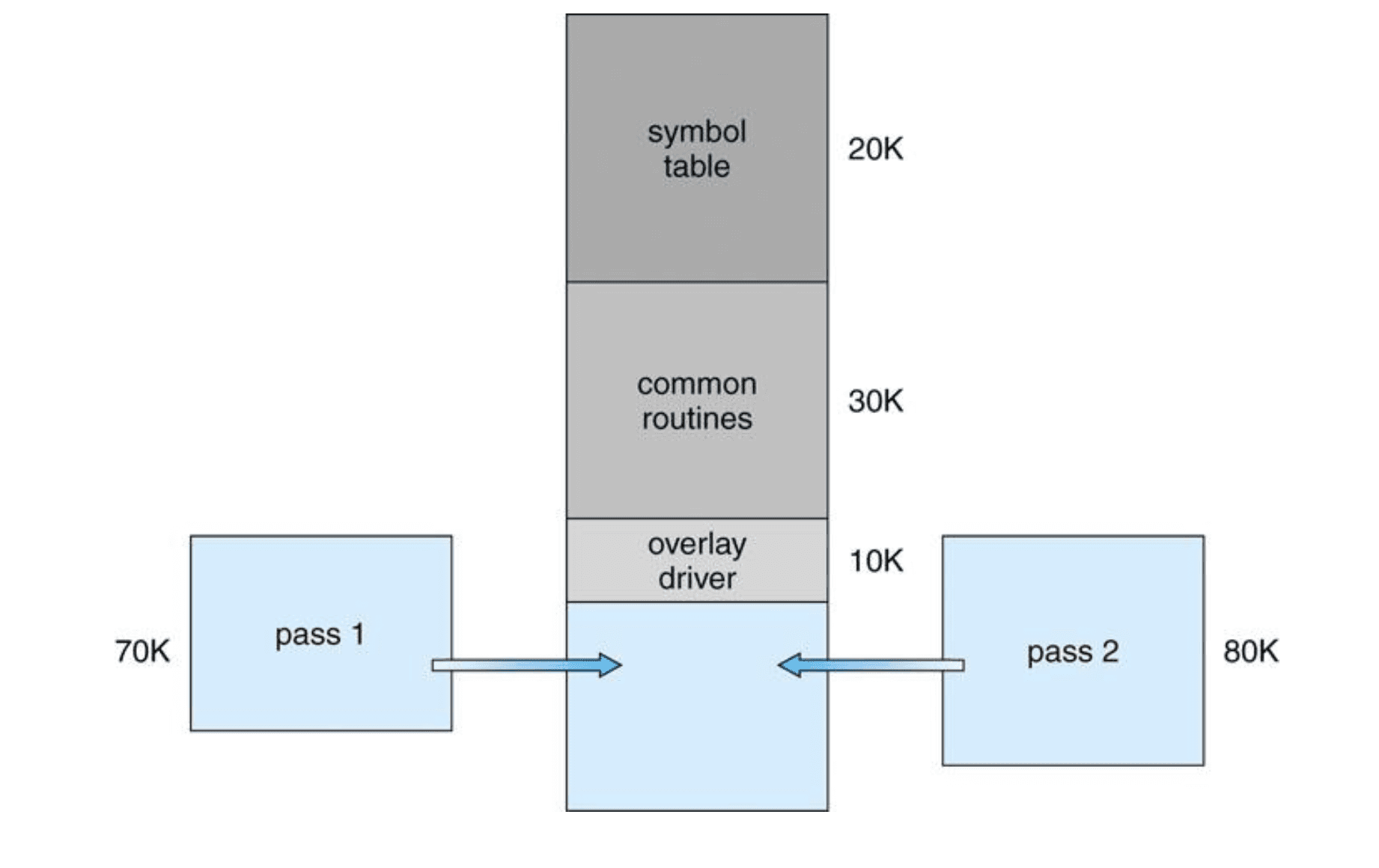
Total size:
20K + 30K +10K + 70K + 80K = 210K
Size needed with overlays:
20K + 30K + 10K + max(70K, 80K) = 140K
4. Swapping
- Temporarily move a process that was in memory out to the backing store (disk).
- Later bring it back into memory and continue running it.
Flow
- The process is in main memory.
- When memory runs short or another process needs to run, the OS swaps the process out to the backing store.
- Later, when that process runs again, it is swapped in from the backing store to main memory.
Backing store
- It's a fast disk.
- It must be large enough to hold copies of all memory images.
- It must provide direct access to each memory image.
Problems
- Most of the swap time is transfer time.
- Transfer time is directly proportional to the amount of memory swapped.
- Swapping a process with pending I/O can cause problems.
5. Virtual Memory
1. Core concept
Virtual memory is a scheme where a process doesn't use actual physical memory addresses directly but uses virtual addresses instead.
- Each process has its own independent virtual address space.
- The same virtual address can be mapped to different physical addresses for different processes.
- The CPU and OS translate virtual addresses into physical addresses.
- A data structure such as a page table is used for this translation.
2. Why is it needed?
When running multiple processes at the same time, it's needed to make each process look like it has its own independent memory space.
- It keeps processes from directly invading each other's memory.
- The programmer doesn't have to care about actual RAM locations.
- A process can use memory as if it had a large, contiguous block.
- Only the needed parts have to be in actual physical memory.
3. Address translation flow
- A CPU instruction produces a virtual address.
- The hardware translates the address with help from the OS.
- The page table is used to find the physical address that corresponds to the virtual address.
- The actual physical memory is accessed.
Process
→ Virtual address
→ OS & CPU with Page Table
→ Physical address
4. Virtual Address Space
The virtual address space is the entire range of virtual addresses a process can use.
The typical layout is as follows.
High addresses
├─ kernel virtual memory
├─ user stack
├─ unused area
├─ run-time heap
├─ read/write segment (.data, .bss)
└─ read-only segment (.text, .rodata)
Low addresses
- The stack is created at runtime.
- The heap is managed by dynamic memory allocation such as malloc.
.dataand.bssare the readable/writable global data areas..textand.rodataare the code and read-only data areas.
5. Lazy Loading
With virtual memory, there's no need to load the whole program into physical memory from the start.
- Only the needed parts are loaded into physical memory.
- Parts not needed yet can stay on disk.
- The process runs as if its entire address space were in memory. This approach leads to demand paging.
6. Advantages
- Separates logical memory from physical memory.
- Provides an independent address space per process.
- Good for protection.
- Can run processes larger than physical memory.
- Only the parts actually used need to be in memory, so more programs can run at the same time.
- With demand paging, only the needed pages are fetched, so I/O can be reduced.
- Makes sharing files and address spaces easier.
- Efficient for process creation.
7. Disadvantages
Virtual memory has performance overhead.
Specifically, it incurs the following costs.
- The time cost of translating virtual addresses into physical addresses
- The space cost of storing and managing page tables
- The cost of page faults when a needed page isn't in memory
8. Implementation methods
Virtual memory is typically implemented in the following ways.
- Paging
- Segmentation