- Published on
CH4. Requirements Analysis
- Authors

- Name
- seren-wib
Contents
- 4. Requirements Analysis
- 4.1 Requirements Definition
- 4.1.1 Functional Requirements
- 4.1.2 Domain Requirements
- 4.2 Non-functional Requirements
- 4.2.1 Performance Requirements
- 4.2.2 Operability, Portability, Compatibility Requirements
- 4.2.3 Usability Requirements
- 4.2.4 Reliability, Maintainability, Availability Requirements
- 4.2.5 Security Requirements
- 4.2.6 Safety Requirements
- 4.2.7 Scalability Requirements
- 4.2.8 Economy Requirements
- 4.2.9 How to Test Non-functional Requirements
- 4.3 Requirements Engineering (RE) Process
- 4.3.1 Step 1: Requirements Elicitation and Analysis
- 4.3.2 Step 2: Requirements Refinement
- 4.3.3 Step 3: Requirements Specification (Software Requirements Specification, SRS)
- 4.3.4 Requirements Validation
- 4.4 Requirements Analysis Methods
- 4.4.1 Stakeholder Analysis
- 4.4.2 Interviews
- 4.4.3 Document Analysis
- 4.4.4 Interface Analysis
- 4.4.5 Focus Groups
- 4.4.6 Surveys
- 4.4.7 Observation
- 4.4.8 Brainstorming
- 4.4.9 Prototyping
- 4.4.10 Joint Application Development (JAD)
- Benchmarking (extra)
- 4.4.11 The 6 Most Popular Requirements Analysis Methods
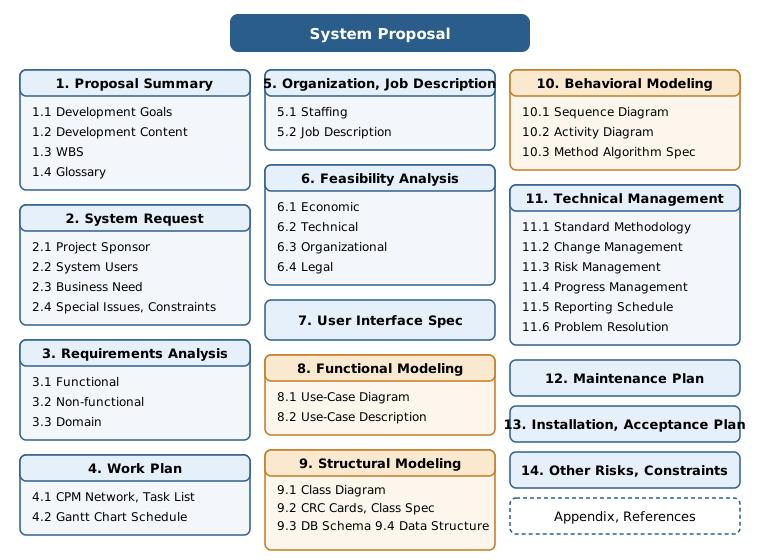
- 4.6 How to Write a System Proposal
4. Requirements Analysis
4.1 Requirements Definition
Software requirements: a specification of the target system's functions, characteristics, services and constraints
- From the user's side, everything known and unknown, explicit and hidden, expected and unexpected is a requirement.
- Classification
- Business requirements
- User requirements
- Software requirements
- Functional requirements
- Non-functional requirements
- Domain requirements
4.1.1 Functional Requirements
Requirements about what the system does
- Expressed as input, computation, output
- Starts from identifying usage scenarios and use cases
- List
- Functions the system performs
- Formulas
- Data manipulation: input, storage, update, search, output
- Business processing
- Interaction with users
- Usage scenarios, use cases
- Workflow
4.1.2 Domain Requirements
Requirements and constraints unique to a specific project; the essential features any system in that field must have
- Must follow industry regulations and standards -- can be functional or non-functional
- Do not change depending on the user
- Main fields: military, medical, finance
4.2 Non-functional Requirements
Requirements about how the system performs its work
Classification
- Environmental constraints: operability, portability, compatibility (execution environment), economy (budget, schedule, staff)
- Quality requirements: performance, reliability and availability, usability, scalability and maintainability, security, safety
- (The slide only names the two categories and does not say which item goes where. The split above is based on the content.)
4.2.1 Performance Requirements
The minimum conditions needed to perform a function
- Requirement items: response time, processing and computing capacity, operating capacity, maintainability, storage space
4.2.2 Operability, Portability, Compatibility Requirements
Requirements about the execution environment
4.2.3 Usability Requirements
Evaluating a good UI: is it comfortable, consistent, fast, and so on
Can be treated the same as user interface requirements
4.2.4 Reliability, Maintainability, Availability Requirements
- Reliability: how often it fails (the goal is not failing)
- Availability: how much time it is actually usable (the goal is fast recovery after a failure)
- Requirement items: tolerated failure frequency, maximum recovery time, the difference between uptime and downtime
4.2.5 Security Requirements
Requirements about how well the system is protected from hacker attacks
4.2.6 Safety Requirements
Requirements defined to reduce hazards
4.2.7 Scalability Requirements
Whether performance requirements are met under high load
- Scale-up (vertical): the specs of a single computer
- Scale-out (horizontal): add several similar servers -- needs load balancing
4.2.8 Economy Requirements
Constraints on resources such as budget, people, equipment and time
4.2.9 How to Test Non-functional Requirements
Each non-functional requirement goes through its own test stage
Test list: load and stress, volume, installation, removal, recovery, documentation
4.3 Requirements Engineering (RE) Process
A systematic process for defining, documenting and maintaining requirements
Elicitation and feasibility analysis → refinement → specification → validation
4.3.1 Step 1: Requirements Elicitation and Analysis
Starts when developers meet stakeholders. The work of finding why the SW is needed, what problem it solves and what constraints exist
- Items to cover
- Development goals and content
- Functional requirements
- Non-functional requirements
- Expected characteristics
- Whether development items are prioritized
- Development and operation constraints
4.3.2 Step 2: Requirements Refinement
The step that thoroughly analyzes and checks the requirements gathered with the techniques in 4.4 (interviews, focus groups, workshops, shadowing, surveys, prototype tests)
- Criteria: is it clear, executable, achievable, verifiable
- Purpose: clarify the stakeholders' real needs and reach agreement
4.3.3 Step 3: Requirements Specification (Software Requirements Specification, SRS)
Writing a technical document based on the defined requirements
Items (add or drop depending on the situation)
- Development goals and details, WBS, glossary
- Functional and non-functional requirements
- Use case diagram, use case specification
- Class diagram, DB schema table specification
- UI specification
- Sequence diagram per use case
- Class method algorithm specification
Specification guidelines
- User requirements → natural language
- Technical requirements → structured language (tools)
- Algorithms → pseudo code
- Forms, GUI → design them and describe
4.3.4 Requirements Validation
Why?: users can ask for illegal or unrealistic things, and experts can misunderstand what was asked When?: must be done after the SRS is finished
Evaluation questions
- Can it actually be implemented
- Does it fit the functions the customer asked for and the domain
- Is it free of ambiguity
- Is it complete
- Can it be shown in a demo
4.4 Requirements Analysis Methods
10 representative methods: stakeholder analysis, document analysis, interviews, focus groups, interface analysis, observation, JAD, surveys, brainstorming, prototyping
4.4.1 Stakeholder Analysis
Requirements analysis starts here. First find the people who are related to or affect the system.
4.4.2 Interviews
- Open questions: free answers
- Closed questions: Yes or No (mostly to confirm answers)
4.4.3 Document Analysis
Collecting and reviewing documents that describe the business environment
- Targets: business plans, technical documents, problem reports, existing requirements documents
- Especially useful for migration projects (fixing or replacing an existing system)
- Compare AS-IS (existing documents) with the TO-BE (future business process) model
4.4.4 Interface Analysis
Finding out how components exchange information
Used to identify systems, stakeholders and processes
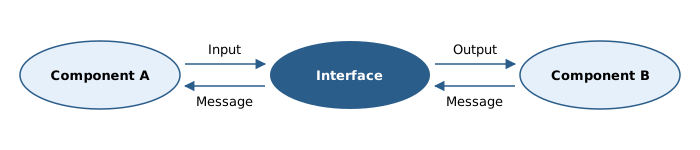
5 focus questions
- who: who uses it
- what: what data is exchanged
- when: when is it exchanged
- how: how is it implemented
- why: why is it needed
4.4.5 Focus Groups
A group including subject matter experts discusses a specific topic to draw out requirements
Creates new requirements, and validates and refines requirements already found
4.4.6 Surveys
Sending a questionnaire with predefined questions and choices to all stakeholders and collecting the answers
Put the questions with the highest risk priority first.
4.4.7 Observation
A method for understanding other people's activities, tasks, the tools they use and events
4.4.8 Brainstorming
A group discussion that draws out new, creative ideas
Criticism is strictly forbidden
4.4.9 Prototyping
Finding requirements by building a model, demoing it, and explaining the business process with diagrams
It can be shown visually, and feedback comes quickly
4.4.10 Joint Application Development (JAD)
A process-oriented method where end users, the PM and developers take part together at the same time to define requirements
Business process improvement workshop: analyze the existing process to find improvements. Less formal than a formal workshop.
Pros
- A requirements document comes out within a few hours
- Gathers the needs of a large group in a short time and reaches agreement with everyone in the room.
Cons
- It can fail if stakeholders are missing
- Success depends on the facilitator's skill
- With too many people it does not reach its goal
Benchmarking (extra)
Compare with the best in the industry
4.4.11 The 6 Most Popular Requirements Analysis Methods
Interviews, focus groups, brainstorming, observation, prototyping, JAD (requirements workshop)
4.6 How to Write a System Proposal
The project's main business plan, written after both development planning (ch3) and requirements analysis (ch4) are finished