
- Published on
CH5. Software Design Principles
- Authors

- Name
- seren-wib
Contents
5. Software Design Principles
5.1 Divide and Conquer
Divide and conquer: split a big problem into pieces small enough to solve directly, solve them, then combine the results (e.g. merge sort)
- Steps
- Divide: recursively split into subproblems until they can't be split further
- Conquer: solve each subproblem recursively
- Combine: merge the subproblem answers into the answer for the original problem
5.2 Modularity
Modularity: split a problem into independent modules with standard interfaces, then combine reusable modules to solve the whole (e.g. hardware built by assembling parts)
- A module with one function is built once and reused
- Module: a piece of code that can be built and maintained independently, so other systems can reuse it
- Modular programming: a design technique that separates program functions into independent, interchangeable modules
- Difference from divide and conquer: both split the problem; modularity adds interfaces, independence and reuse to the pieces
- What a module means
- As independent of other modules as possible
- Reusable in other systems, interchangeable within the system
- A part of the system's code and a function (a structural unit)
- Basic principles
- Good modularity: changing one part barely affects the rest
- High cohesion, loose coupling
- Closely related to structured (procedural) and object-oriented programming; started around the 1960s
- Benefits
- The system is easier to understand
- The system is easier to maintain
- Reuse: a finished module never has to be rewritten
5.3 Abstraction
Abstraction (computer science): pulling only the core concepts or functions out of complex data, modules or systems and expressing them simply (e.g. aerial photo → map with only roads and buildings)
- How to abstract
- Generalization: keep what things have in common, drop the differences (undergrad, grad student → student)
- Removing detail: keep only what matters, delete unneeded detail
- Data: values that represent real-world things as characters, numbers, sound, images, video or text
- Types of data
- Quantitative (numerical) data: physical values measured directly (temperature, price, sales)
- Qualitative (categorical) data: logical values that aren't physical even when written as numbers; nominal and ordinal (gender, blood type, letter grade)
- What to abstract
- Operational data: data the organization needs to run and manage itself; only this gets abstracted
- Abstraction target: the set of data needed to solve the problem
- Non-operational data: everything else, can be ignored
- Operational vs non-operational depends on the system's purpose (student records → students, grades; facility management → roads, buildings)
- Operational data becomes a class: student →
Student { id, name, address, mobile, major }, unneeded attributes are dropped
5.4 Stepwise Refinement
Stepwise refinement: a top-down design method that starts at a high level of abstraction and adds detail at each step on the way down (e.g. "print the average" → input, sum, divide, output → pseudocode → Java)
- Tasks are broken into subtasks, data into data structures
- Start from a big abstract step and split it into smaller tasks, repeating until pseudocode comes out
- Difference from divide and conquer: both split the problem; divide and conquer combines the subanswers again, stepwise refinement concretizes by lowering the level of abstraction until it reaches code
5.5 Information Hiding
Abstraction (what to keep) → encapsulation (bundle it) → information hiding (hide with private, open only through public methods)
Information hiding: hiding a class's internals and allowing access only through defined methods; it starts from abstraction (e.g. private name + public getName())
- Process
- Use abstraction to find what the requirements have in common
- Remove whatever is unrelated to the goal
- Encapsulate the common part
- Give the encapsulated target a data type and hide it
- Basic idea
- Access to a class's internal attributes is restricted; access only through its interface (methods)
- Good information hiding comes from good class abstraction
- Relation to object orientation
- Object-oriented programming starts from information hiding
- The goal of OO is flexibility (extending, replacing, changing functions); information hiding is the strategy that makes it possible
- Java example
class Student {
    private int id;
    private String name;

    public String getName(int id);
    public void setName(int newId, String iname);
}
privateattributes are blocked from outside access, reachable only throughpublicmethods
5.6 Increasing Module Cohesion
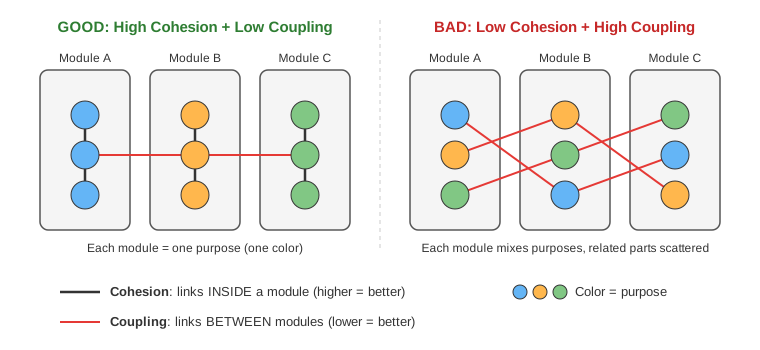
How to read the figure
- Box = module, circle = element inside a module, color = purpose
- Black line = link inside a module (cohesion), red line = link between modules (coupling)
- Left (good): elements with the same purpose sit in one module → strong inside links, few outside links
- Right (bad): elements with the same purpose are scattered across modules → many red lines to reach each other
Cohesion: how tightly the elements inside one module (class) hold together around one purpose; higher is better (e.g. a grade module contains only grade code)
- High: elements closely related, one purpose / Low: loosely related, several purposes
- High cohesion → packages, modules and classes are designed consistently
- Having only functional cohesion is best
- Types (high → low)
| Rank | Type | Meaning | Example |
|---|---|---|---|
| 1 | Functional | Contains exactly the elements one function needs; the ideal | |
| 2 | Sequential | One element's output is the next one's input; data flow | Function calls |
| 3 | Communicational | Groups functions that use the same input or produce the same output data; also called "exchange" cohesion | Update and save a record + send it to the printer |
| 4 | Procedural | Grouped by order of instruction execution; weakly connected, hard to reuse | Read grades → sum → GPA → save → print |
| 5 | Temporal | Groups tasks that run at the same time | Initializing the whole system |
| 6 | Logical | Groups things that are logically similar but functionally unrelated | Input from tape, disk and network |
| 7 | Coincidental | Unrelated things grouped with no purpose; the worst |
5.7 Reducing Coupling Between Modules
Coupling: the degree of interdependence between modules; lower is better (e.g. if A calls B, A and B are coupled)
- High: changing one module affects others / Low: independent, almost no effect
- High coupling looks easier to implement at first, but debugging and fixing get much harder when something fails
- Exchanging only the data that's needed is best
- Types (low coupling → high coupling)
| Rank | Type | Meaning | Example |
|---|---|---|---|
| 1 | Data | Exchange only the data that's needed | add(a, b) |
| 2 | Stamp | Pass a whole data structure | Passing the whole Student object when only the name is needed |
| 3 | Control | Pass control information to change the other module's behavior | A sort function that takes a compare function |
| 4 | External | Depends on modules or hardware outside the software | Protocols, external files, device formats |
| 5 | Common | Share global data; hard to reuse, control access and maintain | Shared global variables |
| 6 | Content | Directly modifies another module's data or passes control flow into it; the worst | Directly modifying another module's internal variable |
- 5 extra types (no rank)
- Temporal: depends on execution timing or order (A must run before B)
- Sequential: one module's output is another's input; a chain of dependencies
- Communicational: share a communication mechanism such as shared messages or a DB
- Functional: depend on each other's functions, e.g. calling another module's functions
- Data-structured: share a common data structure such as a DB table or data file; integrity is hard to keep
- Benefits of low coupling: better maintainability, better modularity (independent development and testing, reuse), better scalability (easy to add and remove modules)
- Drawbacks of high coupling: more complexity, less flexibility, less modularity
5.8 Other Software Design Principles
- Software architecture design, class design patterns, refactoring (covered in later chapters)
5.9 Ways to Build a New Software System
System acquisition strategies: 3 ways to build a new system
- In-house development, customizing a commercial solution, external development through outsourcing
- What to consider: business need, in-house experience, technology the project requires, project management capability, timeline